ในบทความนี้
In this post
1. ปัญหาทางวิศวกรรม
เป้าหมายบทนี้
ตรวจ schema ขนาด ตัวตน และ action ด้วยโค้ด พร้อมพิสูจน์ว่า input ผิดไม่เกิด provider call
ไม่ควรให้โมเดลตัดสินว่า field ใน JSON เป็น string หรือ request ใหญ่เกินไปหรือไม่ เพราะตรวจได้แน่นอน เริ่มที่ HTTP ด้วยข้อจำกัด byte กติกาการ decode และ schema แล้วค่อยตรวจค่าตาม domain companion เริ่มจาก Python object ที่ decode มาแล้ว จึงสาธิตการตรวจ object ไม่ใช่ชั้นรับ network ที่ครบถ้วน endpoint จริงต้องจำกัดขนาดก่อน parse body ที่อาจโตไม่สิ้นสุด
input_check รับเฉพาะ id, issue, repo, action และทุกค่าเป็น string ข้อความ issue ต้องยาว 1–4,000 byte แบบ UTF-8 ภาษาไทยและอักขระนอก ASCII ใช้หลาย byte ต่อหนึ่งตัว จึงนับ byte ให้ตรงกับงบจริง ขอบเขตนี้เลือกให้พอกับ issue เล็กของตัวอย่าง ไม่ได้ยกเพดาน provider มาใช้ การปฏิเสธ field เกินยังกันการยัด principal หรือ approved=true เข้าสัญญาของแอป ส่วนการยืนยันตัวตนยังเป็นหน้าที่แอปเจ้าของระบบ
2. ขอบเขตที่ต้องออกแบบ
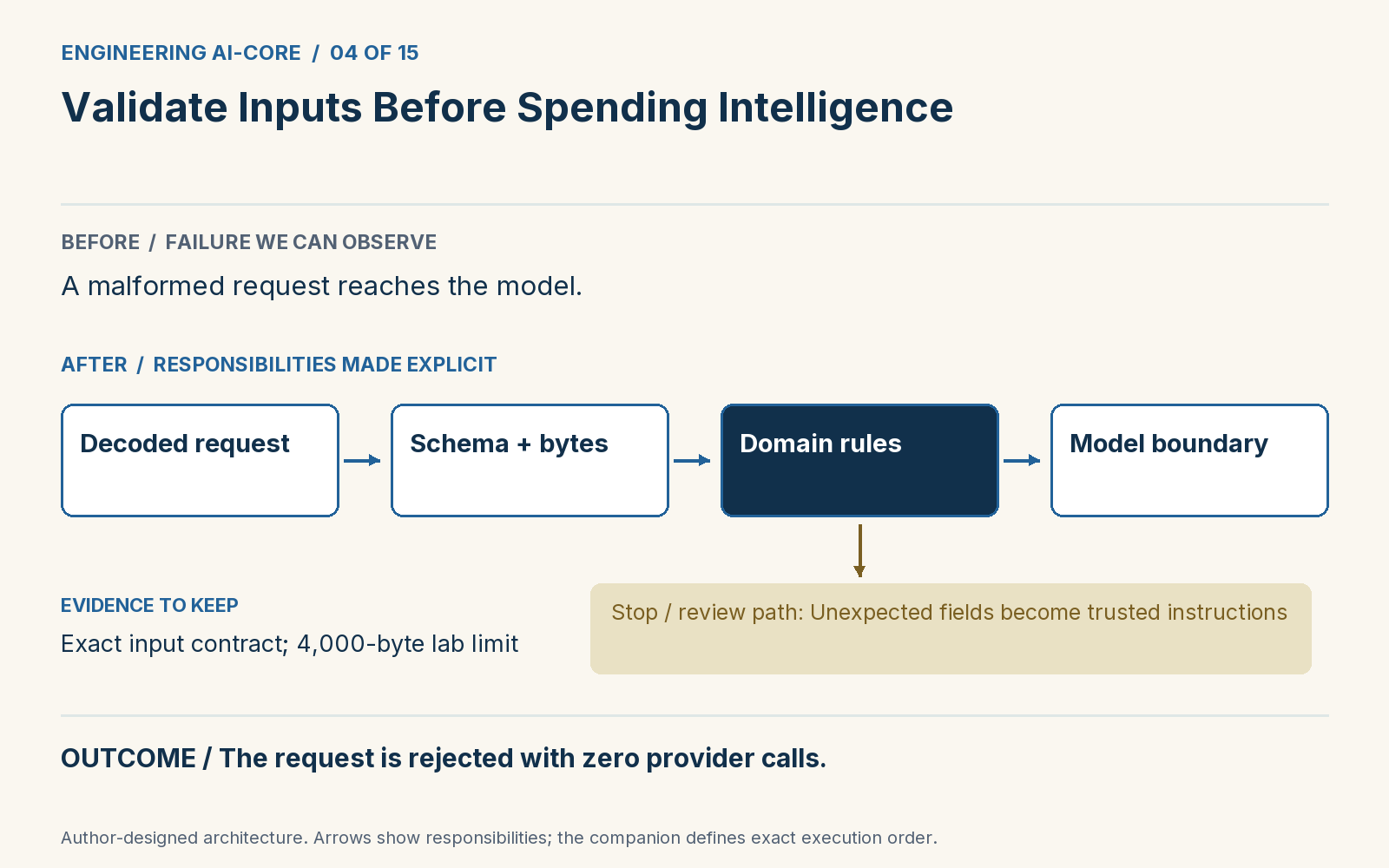
ในแล็บเปลี่ยน issue เป็นเลข 42 แล้วได้ input_type, state=reject, provider_calls=0 จุดนี้แสดงว่าระบบหยุดก่อนประมวลผลด้วยโมเดล test ตรวจจำนวนครั้งเรียก provider โดยตรง รูปแบบเดียวกันใช้กับ id ว่าง ข้อความใหญ่ และ object ผิดรูปได้ type hint ช่วยสื่อสารกับคนเขียน แต่ไม่ได้ตรวจข้อมูลที่เข้าจาก network หรือผู้ใช้ใน runtime โดยอัตโนมัติ
3. อ่าน implementation
ส่วนโค้ดจาก companion เพื่ออ่านประกอบ ใช้คำสั่งในหัวข้อ 5 เพื่อรันตัวอย่างที่ครบ dependency
def input_check(raw):
    if not isinstance(raw, dict) or set(raw) != {"id", "issue", "repo", "action"}:
        return Gate("reject", "input_schema")
    if not all(isinstance(x, str) for x in raw.values()):
        return Gate("reject", "input_type")
    try:
        issue_bytes = raw["issue"].encode("utf-8")
    except UnicodeEncodeError:
        return Gate("reject", "input_encoding")
    if not 1 <= len(issue_bytes) <= 4000 or not raw["id"].strip():
        return Gate("reject", "input_size")
    return Gate("pass", "input_valid")
การ normalize ต้องมีร่องรอย การตัดช่องว่างหรือแปล issue ทำให้ค่าที่นำไปตัดสินเปลี่ยน จึงเก็บ id ต้นฉบับและบันทึก transformation ที่ใช้ เรื่องความลับต้องมีการควบคุมเฉพาะ ลดข้อมูลก่อนส่ง ใช้ redaction ที่ทีมตรวจเมื่อเหมาะสม และไม่ log issue ทั้งก้อนเป็นค่าเริ่มต้น regex ไม่กี่ตัวรับประกันว่าพบ credential ทุกชนิดไม่ได้ แยก validation ที่ตอบได้แน่นอนจาก semantic review เพื่อให้ผู้ใช้แก้ข้อมูลผิดรูปโดยไม่ต้องเรียกโมเดลซ้ำ
4. เปรียบเทียบผลที่ได้
| เส้นทาง | ผลที่สังเกตได้ |
|---|---|
| ก่อนเพิ่มด่านนี้ | ข้อมูลผิดรูปยังถูกส่งให้โมเดล |
| หลังเพิ่มด่านนี้ | ปฏิเสธก่อนเรียก provider แม้แต่ครั้งเดียว |
ผลต่อไปนี้มาจาก fixture ที่กำหนดคำตอบไว้เพื่อตรวจสถาปัตยกรรม ไม่ใช่ผลวัดความแม่น ความเร็ว หรือต้นทุนของ Jev จริง
{
  "state": "reject",
  "reason": "input_type",
  "provider_calls": 0
}
5. รัน ทำให้พัง และอธิบาย
Part 04 code · Implementation · Tests: test_input_stops_before_inference · Exercise
git clone https://github.com/Anirach/ai-core-engineering-workbench.git
cd ai-core-engineering-workbench
git checkout 18cdfcd4156d3d02acb8badf3b3a0a823113e0ed
python3 -m workbench.lesson 4
python3 -m unittest tests.test_boundaries.BoundaryTests.test_input_stops_before_inference -v
ลองทำด้วยตัวเอง
เพิ่มกรณีข้อความไทยที่มี byte เกินขอบเขตเล็กน้อย แล้วตรวจว่า provider ไม่ถูกเรียก
สิ่งที่ต้องส่ง: input ที่ลอง สถานะและเหตุผลที่ได้ และคำอธิบายว่าด่านใดเป็นผู้รับผิดชอบ ห้ามแก้ expected result เพียงเพื่อให้ test ผ่าน
6. แหล่งอ้างอิงและขอบเขต
เอกสารต้นทางและข้อจำกัด
ตรวจเอกสาร 2 พฤศจิกายน 2026 ตัวอย่างและ threshold เป็นการออกแบบเพื่อการสอน การอ้าง [1], [2] ตรงกับลำดับข้างล่าง ยังไม่ได้วัด live API
- Python documentation, Built-in types — str.encodeEncoding text to UTF-8 bytes.
- TypeSafe, Request rules and errorsVendor request constraints are separate from application limits.
1. The engineering problem
Learning outcome
Keep schema, size, identity and action validation in code, and prove invalid requests make zero provider calls.
A model should not decide whether a JSON field is a string or whether a request body is too large. Those checks have exact answers. Start at the HTTP boundary with a byte limit, decoding rules and schema validation; then validate the domain values your application needs. The companion begins at an already-decoded Python object. It therefore demonstrates object validation, not a complete network ingress layer. A production endpoint must enforce its request-size limit before parsing an unbounded body.
input_check requires exactly id, issue, repo and action, all strings. The issue must contain between one and 4,000 UTF-8 bytes. Byte length matters because Thai and other non-ASCII text can use multiple bytes per character. This tutorial limit is chosen for a small issue, not copied from a vendor maximum. Rejecting unknown fields also prevents an attacker from slipping principal or approved=true into the application contract. Authentication remains the host application's responsibility.
2. The boundary to design
The lab replaces issue with the number 42 and observes input_type, state=reject, provider_calls=0. This is a stronger outcome than asking a model to apologize after processing the request. The test spies on the provider and confirms the pipeline stops. The same pattern applies to empty identifiers, huge messages and malformed objects. Ordinary type hints are useful documentation but do not validate a response arriving from a network or a user at runtime.
3. Read the implementation
Implementation excerpt from the companion. Run the complete lesson below with its imports and fixtures.
def input_check(raw):
    if not isinstance(raw, dict) or set(raw) != {"id", "issue", "repo", "action"}:
        return Gate("reject", "input_schema")
    if not all(isinstance(x, str) for x in raw.values()):
        return Gate("reject", "input_type")
    try:
        issue_bytes = raw["issue"].encode("utf-8")
    except UnicodeEncodeError:
        return Gate("reject", "input_encoding")
    if not 1 <= len(issue_bytes) <= 4000 or not raw["id"].strip():
        return Gate("reject", "input_size")
    return Gate("pass", "input_valid")
Be careful about normalization. Trimming whitespace or translating an issue changes the value being evaluated; retain the original identifier and record any transformation you apply. Secret handling needs its own control: minimize what gets sent, use reviewed redaction where appropriate, and do not log entire issues by default. A few regular expressions cannot guarantee detection of every credential. Separate exact validation failures from semantic review so users can repair malformed input without repeatedly invoking the model.
4. Compare the outcomes
| Approach | Observable outcome |
|---|---|
| Before this control | A malformed request reaches the model. |
| After this control | The request is rejected with zero provider calls. |
The following output comes from scripted fixtures that verify architecture behavior. It is not a measurement of live Jev accuracy, latency, or cost.
{
  "state": "reject",
  "reason": "input_type",
  "provider_calls": 0
}
5. Run, break, and explain
Part 04 code · Implementation · Tests: test_input_stops_before_inference · Exercise
git clone https://github.com/Anirach/ai-core-engineering-workbench.git
cd ai-core-engineering-workbench
git checkout 18cdfcd4156d3d02acb8badf3b3a0a823113e0ed
python3 -m workbench.lesson 4
python3 -m unittest tests.test_boundaries.BoundaryTests.test_input_stops_before_inference -v
Your turn
Add a boundary case with Thai text and a byte length just above the limit. Confirm no provider call occurs.
Keep three artifacts: the input you tried, the resulting state and reason, and an explanation of which boundary owns that result. Do not change an expected result merely to make a test pass.
6. Sources and limits
Primary sources and evidence limits
Sources checked 2 November 2026. Examples and thresholds are teaching designs. Inline [1], [2] follow the order below. Live API performance has not been measured.
- Python documentation, Built-in types — str.encodeEncoding text to UTF-8 bytes.
- TypeSafe, Request rules and errorsVendor request constraints are separate from application limits.