
ในบทความนี้
- 🤖 AI ที่อยู่แค่ในแชทไม่เพียงพอ
- 🏗️ Integration Architecture
- 💬 Messaging Channels — ประตูสู่ AI
- 📧 Google Workspace via gog CLI
- 🐙 GitHub Integration — DevOps Automation
- 🗄️ Database Connectors — ข้อมูลคือพลัง
- ⏰ Cron Jobs & Heartbeats — Automation ที่ไม่หยุด
- 🔄 n8n Workflow Automation
- 🏠 Home Assistant IoT — Smart Environment
- 🔧 Building Custom Integrations
In this post
- 🤖 An AI That Only Lives in a Chat Window Is Not Enough
- 🏗️ Integration Architecture
- 💬 Messaging Channels — The Door to the AI
- 📧 Google Workspace via gog CLI
- 🐙 GitHub Integration — DevOps Automation
- 🗄️ Database Connectors — Data Is Power
- ⏰ Cron Jobs & Heartbeats — Automation That Never Stops
- 🔄 n8n Workflow Automation
- 🏠 Home Assistant IoT — Smart Environment
- 🔧 Building Custom Integrations
🤖 AI ที่อยู่แค่ในแชทไม่เพียงพอ
ลองนึกภาพ: AI ที่ฉลาดแค่ไหนก็ตาม หากไม่สามารถเข้าถึงข้อมูลจริงในองค์กรได้ มันก็เป็นเพียง chatbot ที่แพงขึ้น การที่ AI จะมีประโยชน์จริงได้ มันต้องสามารถ:
- อ่าน-ส่ง email เพื่อติดตามงานและสื่อสารกับทีม
- จัดการ calendar สำหรับนัดหมายและ deadline
- Query database เพื่อหาข้อมูลและสร้าง insights
- ทำงานร่วมกับ GitHub สำหรับ code review และ deployment
- ควบคุม smart home เพื่อปรับสภาพแวดล้อมการทำงาน
- เชื่อมต่อกับ tools องค์กร ผ่าน APIs และ webhooks
นี่คือจุดแข็งหลักของ OpenClaw — มันไม่ได้เป็นแค่ AI assistant แต่เป็น integration platform ที่ให้ AI เข้าถึงและทำงานร่วมกับระบบจริงได้ครบวงจร
🏗️ Integration Architecture
OpenClaw ออกแบบมาให้เป็นสะพานเชื่อมระหว่าง AI และโลกจริง โดยมี architecture แบบ hub-and-spoke ที่ยืดหยุ่นและปลอดภัย:
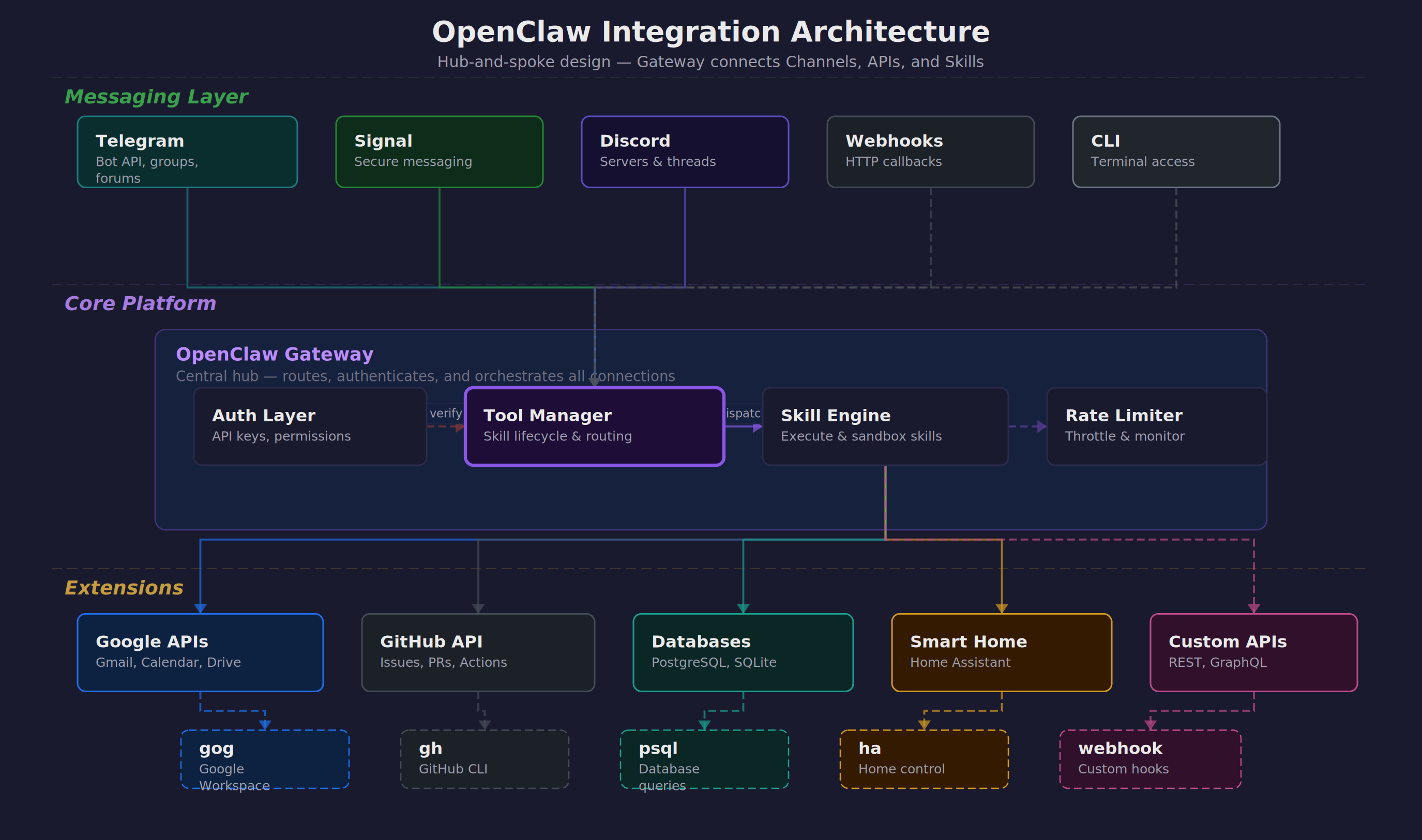
Gateway ทำหน้าที่เป็นตัวกลางที่ปลอดภัย รับ requests จาก channels ต่าง ๆ แล้วส่งต่อไปยัง skills และ external APIs พร้อม authentication, rate limiting, และ logging ครบครัน
Tool Manager จัดการ lifecycle ของ skills ต่าง ๆ ทั้งการ install, update, permission control, และ resource monitoring เพื่อให้แน่ใจว่าระบบทำงานได้เสมอ
Channels รองรับการสื่อสารหลากหลายรูปแบบ — ตั้งแต่ messaging apps สำหรับ end users ไปจนถึง webhooks สำหรับ automated systems
💬 Messaging Channels — ประตูสู่ AI
OpenClaw รองรับ messaging channels หลากหลายรูปแบบ แต่ละตัวมีจุดแข็งและการใช้งานที่แตกต่างกันไป:
Telegram — ตัวเลือกยอดนิยม
Telegram เป็น channel ที่ได้รับความนิยมมากที่สุดเนื่องจากความยืดหยุ่นและ features ที่ครบครัน:
# การตั้งค่า Telegram Bot
# 1. สร้าง bot ผ่าน @BotFather
# 2. เพิ่ม configuration ใน openclaw.json

{
  "channels": {
    "telegram": {
      "enabled": true,
      "bot_token": "YOUR_BOT_TOKEN",
      "allowed_users": [123456789, 987654321],
      "groups": {
        "team_chat": -1001234567890,
        "alerts": -1009876543210
      },
      "forums": {
        "project_threads": {
          "chat_id": -1001111111111,
          "topics": {
            "bug_reports": 2,
            "feature_requests": 3
          }
        }
      }
    }
  }
}
Private chats เหมาะสำหรับงานส่วนตัวและ sensitive operations
Groups ใช้สำหรับ team collaboration และ notifications
Forum topics ช่วยจัดระเบียบการสนทนาตามหัวข้อ
Signal — ความปลอดภัยสูงสุด
Signal มี end-to-end encryption ที่แข็งแกร่ง เหมาะสำหรับองค์กรที่ใส่ใจเรื่องความปลอดภัย:
{
  "channels": {
    "signal": {
      "enabled": true,
      "phone_number": "+66812345678",
      "allowed_contacts": ["+66823456789"],
      "device_name": "OpenClaw-Production"
    }
  }
}
Discord — สำหรับทีมเทคนิค
Discord มี rich formatting และ bot ecosystem ที่เหมาะสำหรับทีมพัฒนาและ DevOps:
{
  "channels": {
    "discord": {
      "enabled": true,
      "bot_token": "YOUR_DISCORD_TOKEN",
      "guild_id": "123456789012345678",
      "channels": {
        "general": "234567890123456789",
        "alerts": "345678901234567890"
      },
      "roles": {
        "admin": "456789012345678901",
        "developer": "567890123456789012"
      }
    }
  }
}
Webhooks — สำหรับ Automation
Webhooks ช่วยให้ระบบภายนอกสามารถ trigger OpenClaw ได้โดยตรง เหมาะสำหรับ event-driven workflows:
# Webhook endpoint configuration
{
  "webhooks": {
    "github": {
      "endpoint": "/webhooks/github",
      "secret": "your-github-secret",
      "events": ["push", "pull_request", "issues"]
    },
    "monitoring": {
      "endpoint": "/webhooks/alerts",
      "auth_token": "your-monitoring-token"
    }
  }
}

# ตัวอย่าง GitHub webhook ที่ trigger auto-review
curl -X POST https://your-domain.com/webhooks/github \
  -H "X-GitHub-Event: pull_request" \
  -H "X-Hub-Signature-256: sha256=..." \
  -d '{"action": "opened", "pull_request": {...}}'
📧 Google Workspace via gog CLI
Google Workspace เป็นหัวใจของการทำงานในองค์กรสมัยใหม่ OpenClaw ใช้ gog CLI เป็นตัวเชื่อมต่อที่ให้ความสามารถครบครันในการจัดการ email, calendar, drive, และ sheets:
Gmail Operations
การจัดการ email ไม่ใช่แค่การอ่านและส่งเท่านั้น แต่ต้องสามารถ search, filter, และ organize ได้อย่างฉลาด:
# ค้นหา emails ตามเงื่อนไขที่ซับซ้อน
gog gmail search "from:[email protected] subject:urgent" \
  --max-results 10 \
  --format json

# ส่ง email พร้อม attachments และ CC
gog gmail send \
  --to "[email protected]" \
  --cc "[email protected]" \
  --subject "Weekly Report - $(date +%Y-%m-%d)" \
  --body-file report.html \
  --attach report.pdf \
  --attach charts.xlsx

# อ่าน email ล่าสุดที่ยังไม่ได้อ่าน
gog gmail list --query "is:unread" --max-results 5 | \
  jq '.[] | {subject: .subject, from: .from, date: .date}'

# Mark emails as read/unread และจัดการ labels
gog gmail modify \
  --id "thread-id-here" \
  --add-labels "IMPORTANT,PROCESSED" \
  --remove-labels "INBOX"
ตัวอย่างการใช้งานจริง: AI สามารถ monitor email จาก monitoring system แล้วสร้าง incident reports โดยอัตโนมัติ พร้อมส่งต่อให้ทีมที่เกี่ยวข้อง
Calendar Management
การจัดการ calendar ที่ดีต้องคำนึงถึง availability, conflicts, และ meeting preparation:
# ดูกำหนดการวันนี้
gog calendar list-events \
  --calendar primary \
  --time-min $(date -Iseconds) \
  --time-max $(date -d "today 23:59:59" -Iseconds)

# สร้าง meeting ใหม่พร้อม attendees
gog calendar create-event \
  --summary "Team Standup" \
  --start "2024-03-15T09:00:00+07:00" \
  --end "2024-03-15T09:30:00+07:00" \
  --attendees "[email protected],[email protected]" \
  --description "Daily standup meeting" \
  --location "Conference Room A"

# ตรวจสอบ free/busy ของทีม
gog calendar freebusy \
  --calendars "[email protected],[email protected]" \
  --time-min "2024-03-15T08:00:00Z" \
  --time-max "2024-03-15T18:00:00Z"

# Update หรือยกเลิก meeting
gog calendar update-event \
  --event-id "event-id-here" \
  --summary "Team Standup (Updated)"
Google Drive Integration
Drive ไม่ใช่แค่ที่เก็บไฟล์ แต่เป็น collaboration hub ที่ AI สามารถจัดการและ organize ได้อย่างชาญฉลาด:
# Upload files พร้อม metadata และ sharing
gog drive upload /local/report.pdf \
  --folder "Reports/2024/Q1" \
  --name "Weekly Report - Week 11" \
  --description "Generated by OpenClaw" \
  --share-with "[email protected]:reader"

# ค้นหาไฟล์ตามเนื้อหาและ metadata
gog drive search \
  --query "name contains 'budget' and modifiedTime > '2024-01-01'" \
  --fields "id,name,modifiedTime,owners"

# Batch operations สำหรับการจัดระเบียบ
gog drive list --folder "Inbox" | jq -r '.[] | .id' | \
  xargs -I {} gog drive move {} --destination "Archive/2024"

# สร้างและแชร์ folders สำหรับ projects
gog drive create-folder "Project Alpha" \
  --parent "Active Projects" \
  --share-with "[email protected]:writer"
Google Sheets — Data Operations
Sheets เป็น lightweight database ที่ AI สามารถใช้สำหรับ tracking, reporting, และ simple data operations:
# อ่านข้อมูลจาก sheet
gog sheets read \
  --spreadsheet "1BxiMVs0XRA5nFMdKvBdBZjgmUUqptlbs74OgvE2upms" \
  --range "A1:E10" \
  --format json

# เขียนข้อมูลลง sheet
echo "Date,Task,Status,Assignee" | \
  gog sheets write \
    --spreadsheet "spreadsheet-id" \
    --range "A1:D1" \
    --format csv

# Update ข้อมูลแบบ batch
gog sheets batch-update \
  --spreadsheet "spreadsheet-id" \
  --updates-file updates.json

# สร้าง charts และ pivot tables
gog sheets create-chart \
  --spreadsheet "spreadsheet-id" \
  --range "A1:C10" \
  --chart-type "LINE"
🐙 GitHub Integration — DevOps Automation
GitHub เป็น backbone ของการพัฒนา software ในองค์กร OpenClaw ทำให้ AI สามารถเข้าไปช่วยในทุกขั้นตอนของ development lifecycle:
Repository Management
การจัดการ repositories, branches, และ releases ที่ช่วยให้ทีมทำงานได้อย่างมีประสิทธิภาพ:
# Clone และ setup repository
gh repo clone company/project-alpha
cd project-alpha
gh repo set-default company/project-alpha

# สร้าง branch สำหรับ feature ใหม่
gh repo create-branch feature/user-authentication \
  --source main

# ตรวจสอบสถานะ CI/CD
gh run list --limit 10 --json status,conclusion,headBranch
gh run view 123456789 --log

# Create และ manage releases
gh release create v1.2.0 \
  --title "Version 1.2.0 - New Authentication" \
  --notes-file CHANGELOG.md \
  --target main
Issue & PR Management
การจัดการ issues และ pull requests ที่ช่วยให้ process พัฒนาเป็นไปอย่างราบรื่น:
# ดู issues ที่ assigned ให้ตัวเอง
gh issue list --assignee @me --state open

# สร้าง issue ใหม่พร้อม template
gh issue create \
  --title "Add password reset functionality" \
  --body-file .github/ISSUE_TEMPLATE/feature_request.md \
  --label "feature,backend" \
  --assignee alice

# Review pull requests
gh pr list --state open --review-requested @me
gh pr checkout 123
gh pr review 123 \
  --approve \
  --body "LGTM! Great implementation of password reset."

# Merge PR ผ่าน CLI
gh pr merge 123 --squash --delete-branch
Automated PR Workflows
OpenClaw มี skill พิเศษ /gh-issues ที่ช่วยทำ end-to-end automation ตั้งแต่หา issues, implement fixes, สร้าง PR, จนถึง respond กับ review comments:
# ใช้ /gh-issues skill สำหรับ automation
/gh-issues company/project \
  --label bug \
  --limit 5 \
  --watch \
  --model claude-3-sonnet

# Skill จะ:
# 1. ค้นหา issues ที่ label "bug"
# 2. วิเคราะห์ความซับซ้อนและความเป็นไปได้
# 3. สร้าง implementation plan
# 4. เขียน code และ tests
# 5. สร้าง PR พร้อม description ที่ละเอียด
# 6. Monitor และ respond กับ review comments
# 7. อัพเดต code ตาม feedback
Code Quality & Security
การรักษา code quality และ security ผ่าน automated checks และ reviews:
# ตรวจสอบ security vulnerabilities
gh api repos/company/project/vulnerability-alerts

# Review code changes
gh pr diff 123 --name-only | \
  xargs -I {} echo "Reviewing: {}"

# ตั้งค่า branch protection
gh api repos/company/project/branches/main/protection \
  --method PUT \
  --field required_status_checks='{"strict":true,"contexts":["ci/tests"]}' \
  --field enforce_admins=true \
  --field required_pull_request_reviews='{"required_approving_review_count":2}'
🗄️ Database Connectors — ข้อมูลคือพลัง
ข้อมูลใน database คือ goldmine ที่ AI สามารถนำมาใช้สร้าง insights และตอบคำถามทางธุรกิจได้ แต่ต้องทำอย่างปลอดภัยและมีระเบียบ:
Secure Database Access Pattern
OpenClaw ใช้ pattern VPN + wrapper script เพื่อให้แน่ใจว่าการเข้าถึง database ปลอดภัยและ controlled:
# ha_query.py - Safe database wrapper
# ไฟล์นี้ handle VPN connection และ de-identification

#!/usr/bin/env python3
import psycopg2
import re
import hashlib
from datetime import datetime

class SafeDBQuery:
    def __init__(self):
        self.vpn_connected = self.check_vpn()
        self.db_config = self.load_config()

    def query(self, sql):
        # 1. Validate SQL (prevent dangerous operations)
        if not self.is_safe_query(sql):
            raise ValueError("Unsafe query detected")

        # 2. Execute with connection pooling
        result = self.execute_query(sql)

        # 3. De-identify sensitive data
        return self.de_identify(result)

    def de_identify(self, data):
        # Hash personal identifiers
        # Replace sensitive values with anonymized versions
        # Log access for audit trail
        pass

# การใช้งาน - เรียกผ่าน wrapper เท่านั้น
python3 tools/ha_query.py "SELECT patient_count, avg_age FROM patient_summary WHERE date = '2024-03-10'"
Practical Database Example
ตัวอย่างการใช้งานจริงกับ hospital database ที่ต้องการ insights เร็ว ๆ แต่ปลอดภัย:
# Query สำหรับ daily dashboard
python3 tools/ha_query.py """
SELECT
    department,
    COUNT(*) as patient_count,
    AVG(satisfaction_score) as avg_satisfaction,
    COUNT(CASE WHEN severity = 'critical' THEN 1 END) as critical_cases
FROM patient_visits
WHERE visit_date = CURRENT_DATE
GROUP BY department
ORDER BY critical_cases DESC
"""

# ผลลัพธ์ (de-identified):
# department        | patient_count | avg_satisfaction | critical_cases
# Emergency         | 45           | 4.2             | 3
# ICU              | 12           | 4.8             | 8
# General Medicine  | 78           | 4.5             | 0

# Query สำหรับ trend analysis
python3 tools/ha_query.py """
WITH monthly_stats AS (
    SELECT
        DATE_TRUNC('month', visit_date) as month,
        department,
        COUNT(*) as visits,
        AVG(length_of_stay) as avg_los
    FROM patient_visits
    WHERE visit_date >= CURRENT_DATE - INTERVAL '12 months'
    GROUP BY 1, 2
)
SELECT * FROM monthly_stats
WHERE department = 'Emergency'
ORDER BY month DESC
"""
Data Pipeline & ETL
การสร้าง data pipeline สำหรับ regular reports และ analytics:
#!/bin/bash
# daily_report.sh - Automated data pipeline

# 1. Extract data สำหรับ yesterday
YESTERDAY=$(date -d "yesterday" +%Y-%m-%d)
python3 tools/ha_query.py "
SELECT * FROM daily_summary WHERE date = '$YESTERDAY'
" > /tmp/daily_data.csv

# 2. Transform และสร้าง charts
python3 scripts/generate_charts.py /tmp/daily_data.csv

# 3. สร้าง PDF report
python3 scripts/create_pdf_report.py \
  --data /tmp/daily_data.csv \
  --charts /tmp/charts/ \
  --template templates/daily_report.html \
  --output "reports/Daily_Report_$YESTERDAY.pdf"

# 4. Upload ไป Drive และส่ง notification
python3 gdrive/gdrive_upload.py \
  "reports/Daily_Report_$YESTERDAY.pdf" \
  --folder "Reports/Daily" \
  --name "Daily Report - $YESTERDAY"

# 5. ส่ง summary ผ่าน Telegram
python3 tools/send_telegram.py \
  "📊 Daily Report สำหรับ $YESTERDAY พร้อมแล้ว"
⏰ Cron Jobs & Heartbeats — Automation ที่ไม่หยุด
การทำงานอัตโนมัติเป็นหัวใจของ productive organization OpenClaw มีระบบ cron และ heartbeat ที่ช่วยให้งานต่าง ๆ เกิดขึ้นตามเวลาและมีการ monitor สถานะอย่างต่อเนื่อง:
OpenClaw Cron Configuration
การตั้งค่า cron jobs ผ่าน openclaw.json ที่ให้ความยืดหยุ่นและ reliability สูง:
{
  "cron": {
    "daily_reports": {
      "schedule": "0 8 * * *",
      "skill": "data-analysis",
      "params": {
        "source": "hospital_db",
        "report_type": "daily_summary",
        "recipients": ["[email protected]"]
      },
      "enabled": true,
      "timeout": 1800
    },
    "backup_verification": {
      "schedule": "0 2 * * *",
      "command": "bash /scripts/verify_backups.sh",
      "notify_on_failure": "[email protected]",
      "retry_attempts": 3
    },
    "weekly_cost_report": {
      "schedule": "0 9 * * MON",
      "skill": "aws-cost-analyzer",
      "params": {
        "period": "last_week",
        "breakdown": ["service", "region", "team"]
      }
    },
    "security_scan": {
      "schedule": "0 */6 * * *",
      "skill": "security-auditor",
      "params": {
        "scan_type": "vulnerability_check"
      }
    }
  }
}
Heartbeat System
Heartbeat system ช่วย monitor สุขภาพของระบบต่าง ๆ และส่ง proactive alerts เมื่อมีสิ่งที่ต้องให้ความสนใจ:
# heartbeat_config.json
{
  "heartbeat": {
    "interval": 300,  // 5 minutes
    "checks": {
      "email": {
        "type": "gmail_unread",
        "threshold": 50,
        "alert_message": "📧 Inbox เต็ม: มี email ใหม่ {{count}} ฉบับ"
      },
      "calendar": {
        "type": "upcoming_meetings",
        "lookahead": 15,  // minutes
        "alert_message": "🗓️ Meeting เหลือ 15 นาที: {{meeting_title}}"
      },
      "system": {
        "type": "disk_space",
        "threshold": 85,  // percent
        "alert_message": "💾 Disk space ใกล้เต็ม: {{usage}}%"
      },
      "database": {
        "type": "connection_check",
        "timeout": 10,
        "alert_message": "🚨 Database connection failed"
      }
    },
    "quiet_hours": {
      "start": "23:00",
      "end": "08:00",
      "timezone": "Asia/Bangkok"
    }
  }
}

# ตัวอย่าง heartbeat script
#!/usr/bin/env python3
# heartbeat.py

import json
import time
from datetime import datetime, timedelta

class HeartbeatMonitor:
    def __init__(self):
        self.config = self.load_config()
        self.last_checks = {}

    def run_checks(self):
        for check_name, config in self.config['checks'].items():
            if self.should_run_check(check_name):
                result = self.execute_check(check_name, config)
                if result['alert_needed']:
                    self.send_alert(check_name, result)
                self.last_checks[check_name] = datetime.now()

    def execute_check(self, check_name, config):
        if config['type'] == 'gmail_unread':
            count = self.get_unread_count()
            return {
                'alert_needed': count > config['threshold'],
                'data': {'count': count}
            }
        # ... other check types

    def send_alert(self, check_name, result):
        message = self.format_message(
            self.config['checks'][check_name]['alert_message'],
            result['data']
        )
        # ส่งผ่าน Telegram หรือ notification channel อื่น
        self.send_notification(message)
Scheduled Task Examples
ตัวอย่างงานที่ทำแบบ scheduled ที่ช่วยให้องค์กรทำงานได้อย่างมีประสิทธิภาพ:
# 1. News Digest - ทุกเช้า 7:30
{
  "schedule": "30 7 * * *",
  "skill": "news-aggregator",
  "params": {
    "sources": ["techcrunch", "ars-technica", "hacker-news"],
    "keywords": ["AI", "healthcare", "startup"],
    "summary_length": "brief"
  }
}

# 2. Weekly Team Update - ทุกศุกร์ 5 PM
{
  "schedule": "0 17 * * FRI",
  "command": "bash scripts/weekly_team_update.sh",
  "description": "Aggregate team progress and send summary"
}

# 3. Backup Verification - ทุกวัน 2 AM
{
  "schedule": "0 2 * * *",
  "skill": "backup-verifier",
  "params": {
    "sources": ["database", "user_files", "configuration"],
    "verify_integrity": true,
    "alert_on_failure": true
  }
}

# 4. Performance Monitoring - ทุก 15 นาที
{
  "schedule": "*/15 * * * *",
  "skill": "system-monitor",
  "params": {
    "metrics": ["cpu", "memory", "disk", "network"],
    "threshold_alert": true
  }
}
🔄 n8n Workflow Automation
n8n เป็น visual workflow builder ที่ช่วยให้การสร้าง complex automation เป็นเรื่องง่าย OpenClaw สามารถเชื่อมต่อกับ n8n ได้ทั้งในฐานะ trigger และ action node:
n8n + OpenClaw Integration
การเชื่อมต่อระหว่าง n8n และ OpenClaw ทำได้ผ่าน webhooks และ HTTP requests:
# n8n workflow configuration
{
  "name": "Customer Support Automation",
  "nodes": [
    {
      "type": "webhook",
      "name": "New Support Ticket",
      "parameters": {
        "path": "support-ticket",
        "method": "POST"
      }
    },
    {
      "type": "http-request",
      "name": "Analyze Ticket with OpenClaw",
      "parameters": {
        "url": "https://your-openclaw.com/api/analyze-ticket",
        "method": "POST",
        "body": {
          "ticket_content": "{{ $json.ticket_content }}",
          "customer_info": "{{ $json.customer }}"
        }
      }
    },
    {
      "type": "switch",
      "name": "Route by Priority",
      "parameters": {
        "rules": [
          {
            "condition": "{{ $json.priority === 'urgent' }}",
            "output": 1
          },
          {
            "condition": "{{ $json.priority === 'normal' }}",
            "output": 2
          }
        ]
      }
    }
  ]
}
Practical Workflow Examples
ตัวอย่าง workflows ที่ใช้งานจริงในองค์กร:
# Workflow 1: Invoice Processing
GitHub Issue → Extract Data → Validate → Update Database → Send Notification

# n8n nodes:
1. GitHub Webhook (new issue with "invoice" label)
2. OpenClaw PDF Processor (extract invoice data)
3. Data Validation Node
4. Database Update (via OpenClaw)
5. Slack/Teams Notification

# Workflow 2: Employee Onboarding
HR Form → Create Accounts → Setup Access → Send Welcome Package

# n8n nodes:
1. Form Trigger (new employee data)
2. OpenClaw User Creation (Google Workspace)
3. GitHub Team Assignment
4. Office 365 License Assignment
5. Welcome Email + Calendar Setup

# Workflow 3: Incident Response
Monitoring Alert → Assess Severity → Create Ticket → Notify Team → Track Resolution

# n8n nodes:
1. Webhook from Monitoring System
2. OpenClaw Log Analysis
3. Incident Classification
4. Jira Ticket Creation
5. PagerDuty/OpsGenie Alert
6. Status Updates to Slack
Advanced Workflow Patterns
Patterns ที่ช่วยให้ workflows มีประสิทธิภาพและ reliable มากขึ้น:
# Human-in-the-loop approval
{
  "approval_node": {
    "type": "manual-trigger",
    "name": "Manager Approval",
    "parameters": {
      "webhook_url": "https://your-domain/approve/{{workflow_id}}",
      "timeout": 86400,  // 24 hours
      "fallback_action": "reject"
    }
  }
}

# Error handling และ retry logic
{
  "error_handling": {
    "on_error": "retry",
    "max_attempts": 3,
    "retry_delay": 300,  // 5 minutes
    "fallback_workflow": "error-notification"
  }
}

# Batch processing
{
  "batch_node": {
    "type": "split-in-batches",
    "parameters": {
      "batch_size": 10,
      "options": {
        "reset": false
      }
    }
  }
}
🏠 Home Assistant IoT — Smart Environment
การควบคุม smart home ผ่าน Home Assistant ช่วยให้ AI สามารถปรับสภาพแวดล้อมการทำงานให้เหมาะสมและ respond กับ events ต่าง ๆ ได้อย่างอัตโนมัติ:
Home Assistant REST API
OpenClaw เชื่อมต่อกับ Home Assistant ผ่าน REST API เพื่อควบคุม devices และดึง sensor data:
# การตั้งค่าการเชื่อมต่อ Home Assistant
{
  "home_assistant": {
    "url": "https://your-ha-instance.duckdns.org",
    "token": "your-long-lived-access-token",
    "verify_ssl": true,
    "timeout": 30
  }
}

# ควบคุม lights และ switches
curl -X POST \
  -H "Authorization: Bearer YOUR_TOKEN" \
  -H "Content-Type: application/json" \
  -d '{"entity_id": "light.office_main"}' \
  https://your-ha.com/api/services/light/turn_on

# ปรับ brightness และ color
curl -X POST \
  -H "Authorization: Bearer YOUR_TOKEN" \
  -H "Content-Type: application/json" \
  -d '{
    "entity_id": "light.office_main",
    "brightness": 180,
    "rgb_color": [255, 200, 150]
  }' \
  https://your-ha.com/api/services/light/turn_on

# ควบคุม climate (aircon/heater)
curl -X POST \
  -H "Authorization: Bearer YOUR_TOKEN" \
  -H "Content-Type: application/json" \
  -d '{
    "entity_id": "climate.office_ac",
    "temperature": 24,
    "hvac_mode": "cool"
  }' \
  https://your-ha.com/api/services/climate/set_temperature
Practical Smart Home Examples
ตัวอย่างการใช้งาน smart home ที่เชื่อมต่อกับงานจริง:
# Scene สำหรับ Deep Work
# - เปิดไฟแสงสีขาวเย็น (focus mode)
# - ปิดเสียงรบกวน
# - ตั้ง aircon ให้เย็นหน่อย (22°C)
# - เปิด white noise

curl -X POST \
  -H "Authorization: Bearer YOUR_TOKEN" \
  -H "Content-Type: application/json" \
  -d '{"entity_id": "scene.deep_work"}' \
  https://your-ha.com/api/services/scene/turn_on

# Meeting Mode
# - ปิดไฟที่อาจแสงสะท้อนจอ
# - เช็คว่า microphone ไม่ mute
# - เปิดกล้องและปรับมุม
# - ปิดเสียงโทรศัพท์

curl -X POST \
  -H "Authorization: Bearer YOUR_TOKEN" \
  -H "Content-Type: application/json" \
  -d '{"entity_id": "scene.meeting_mode"}' \
  https://your-ha.com/api/services/scene/turn_on

# Break Time
# - เปิดเพลงเบา ๆ
# - ปรับไฟให้อบอุ่น
# - เริ่ม timer 15 นาที
# - แจ้งเตือนเมื่อครบ

curl -X POST \
  -H "Authorization: Bearer YOUR_TOKEN" \
  -H "Content-Type: application/json" \
  -d '{"entity_id": "script.break_time_sequence"}' \
  https://your-ha.com/api/services/script/turn_on
Bidirectional Communication
ไม่ใช่แค่ OpenClaw ควบคุม Home Assistant แต่ HA ก็สามารถ trigger OpenClaw ได้ผ่าน webhooks:
# Home Assistant automation ที่ส่ง webhook ไป OpenClaw
automation:
  - alias: "Motion Detected in Office"
    trigger:
      platform: state
      entity_id: binary_sensor.office_motion
      to: 'on'
    condition:
      condition: time
      after: '18:00:00'
    action:
      service: rest_command.notify_openclaw
      data:
        message: "Motion detected in office after hours"
        location: "office"
        timestamp: "{{ now().isoformat() }}"

# REST command configuration
rest_command:
  notify_openclaw:
    url: "https://your-openclaw.com/webhooks/motion"
    method: POST
    headers:
      Authorization: "Bearer YOUR_WEBHOOK_TOKEN"
      Content-Type: "application/json"
    payload: >
      {
        "event": "motion_detected",
        "data": {{ data | tojson }}
      }

# OpenClaw สามารถ respond ได้ เช่น:
# - ส่ง notification ไป security team
# - เปิดกล้องและ record video
# - เช็ค badge access logs
# - หากเป็นเวลาผิดปกติ → alert security guard
🔧 Building Custom Integrations
ความแข็งแกร่งของ OpenClaw อยู่ที่ความสามารถในการขยายและเพิ่ม integrations ใหม่ ๆ ได้อย่างง่ายดาย นี่คือ patterns และ best practices สำหรับการสร้าง custom integrations:
Integration Patterns
มี 4 รูปแบบหลักในการสร้าง integrations ขึ้นกับความซับซ้อนและความต้องการ:
# 1. Simple Bash Script Wrapper
#!/bin/bash
# tools/slack_notify.sh

API_TOKEN="your-slack-token"
CHANNEL="$1"
MESSAGE="$2"

curl -X POST https://slack.com/api/chat.postMessage \
  -H "Authorization: Bearer $API_TOKEN" \
  -H "Content-Type: application/json" \
  -d "{
    \"channel\": \"$CHANNEL\",
    \"text\": \"$MESSAGE\"
  }"

# Usage: bash tools/slack_notify.sh "#general" "Deployment complete"

# 2. Python API Wrapper
#!/usr/bin/env python3
# tools/jira_helper.py

import requests
import json
import sys

class JiraAPI:
    def __init__(self, base_url, email, token):
        self.base_url = base_url
        self.auth = (email, token)

    def create_issue(self, project, summary, description):
        data = {
            "fields": {
                "project": {"key": project},
                "summary": summary,
                "description": description,
                "issuetype": {"name": "Task"}
            }
        }

        response = requests.post(
            f"{self.base_url}/rest/api/2/issue",
            json=data,
            auth=self.auth
        )

        return response.json()

if __name__ == "__main__":
    jira = JiraAPI(sys.argv[1], sys.argv[2], sys.argv[3])
    result = jira.create_issue(sys.argv[4], sys.argv[5], sys.argv[6])
    print(json.dumps(result, indent=2))
OpenClaw Skill Creation
สำหรับ integrations ที่ซับซ้อนกว่า ให้สร้างเป็น OpenClaw Skill ที่มี metadata, documentation, และ error handling ครบครัน:
# skill.json - Skill metadata
{
  "name": "salesforce-crm",
  "version": "1.0.0",
  "description": "Salesforce CRM integration for lead and opportunity management",
  "author": "Your Organization",
  "dependencies": ["requests", "python-salesforce"],
  "permissions": [
    "api:salesforce.com",
    "file:read:./config/",
    "env:SALESFORCE_*"
  ],
  "configuration": {
    "required": ["instance_url", "client_id", "client_secret"],
    "optional": ["sandbox_mode", "timeout"]
  }
}

# main.py - Skill implementation
#!/usr/bin/env python3

import os
import json
import requests
from typing import Dict, List, Optional

class SalesforceSkill:
    def __init__(self):
        self.config = self.load_config()
        self.session = self.authenticate()

    def load_config(self) -> Dict:
        config_path = os.path.join(os.path.dirname(__file__), 'config.json')
        with open(config_path) as f:
            config = json.load(f)

        # Override with environment variables
        for key in ['client_id', 'client_secret', 'username', 'password']:
            env_var = f"SALESFORCE_{key.upper()}"
            if env_var in os.environ:
                config[key] = os.environ[env_var]

        return config

    def authenticate(self) -> requests.Session:
        # OAuth 2.0 authentication flow
        # Return authenticated session
        pass

    def search_leads(self, query: str, limit: int = 10) -> List[Dict]:
        """Search for leads matching the query"""
        try:
            soql = f"SELECT Id, Name, Email, Company FROM Lead WHERE Name LIKE '%{query}%' LIMIT {limit}"
            response = self.session.get(
                f"{self.config['instance_url']}/services/data/v57.0/query",
                params={'q': soql}
            )
            response.raise_for_status()
            return response.json()['records']
        except Exception as e:
            self.handle_error(e)
            return []

    def handle_error(self, error):
        # Proper error logging and user-friendly messages
        pass

# CLI interface
if __name__ == "__main__":
    import argparse

    parser = argparse.ArgumentParser(description='Salesforce CRM Operations')
    parser.add_argument('action', choices=['search-leads', 'create-lead', 'update-opportunity'])
    parser.add_argument('--query', help='Search query')
    parser.add_argument('--limit', type=int, default=10)

    args = parser.parse_args()

    skill = SalesforceSkill()

    if args.action == 'search-leads':
        results = skill.search_leads(args.query, args.limit)
        print(json.dumps(results, indent=2))
API Integration Best Practices
หลักการสำคัญในการสร้าง integrations ที่ robust และ production-ready:
# 1. Rate Limiting และ Retries
import time
import random
from functools import wraps

def retry_with_backoff(retries=3, backoff_factor=1):
    def decorator(func):
        @wraps(func)
        def wrapper(*args, **kwargs):
            for attempt in range(retries):
                try:
                    return func(*args, **kwargs)
                except requests.exceptions.RequestException as e:
                    if attempt == retries - 1:
                        raise e

                    wait_time = backoff_factor * (2 ** attempt) + random.uniform(0, 1)
                    time.sleep(wait_time)

        return wrapper
    return decorator

# 2. Configuration Management
class ConfigManager:
    def __init__(self, config_file='config.json'):
        self.config = self.load_config(config_file)

    def load_config(self, config_file):
        # Load from file
        # Override with environment variables
        # Validate required fields
        # Return merged config
        pass

    def get_secret(self, key):
        # Secure secret retrieval
        # Support for various secret backends (AWS Secrets Manager, HashiCorp Vault, etc.)
        pass

# 3. Structured Logging
import logging
import json

def setup_logging():
    logging.basicConfig(
        level=logging.INFO,
        format='%(asctime)s - %(name)s - %(levelname)s - %(message)s',
        handlers=[
            logging.FileHandler('integration.log'),
            logging.StreamHandler()
        ]
    )

def log_api_call(endpoint, method, status_code, response_time):
    logger = logging.getLogger(__name__)
    logger.info(json.dumps({
        'event': 'api_call',
        'endpoint': endpoint,
        'method': method,
        'status_code': status_code,
        'response_time_ms': response_time
    }))

# 4. Health Checks
def health_check():
    checks = {
        'api_connectivity': check_api_connection(),
        'authentication': check_auth_status(),
        'rate_limits': check_rate_limit_status(),
        'last_successful_call': get_last_success_timestamp()
    }

    healthy = all(checks.values())

    return {
        'healthy': healthy,
        'checks': checks,
        'timestamp': time.time()
    }
🎯 Key Takeaways
- Integration เป็นหัวใจ: AI ที่มีประโยชน์จริงต้องเชื่อมต่อกับระบบจริงได้ — email, calendar, database, GitHub, smart home
- Security-first design: ทุก integration ต้องผ่าน authentication, authorization, และ audit logging ที่เข้มงวด
- Multi-channel support: รองรับการสื่อสารผ่าน Telegram, Signal, Discord, webhooks ตามความเหมาะสมของแต่ละ use case
- Google Workspace เป็น backbone: Gmail, Calendar, Drive, Sheets ครอบคลุมงานส่วนใหญ่ในองค์กร
- GitHub automation ประหยัดเวลามาก: ตั้งแต่ issue tracking ไปจนถึง automated PR และ code review
- Database access ต้องปลอดภัย: ใช้ wrapper scripts, VPN, de-identification pipeline — ไม่เอา raw access
- Cron + Heartbeat = Reliability: งานสำคัญต้องทำแบบ scheduled, status monitoring แบบ proactive
- n8n ขยายความสามารถ: Visual workflow builder ทำให้ complex automation เป็นเรื่องง่าย
- Smart home เพิ่มประสิทธิภาพ: ปรับสภาพแวดล้อมการทำงานอัตโนมัติตาม context
- Custom integrations ทำได้ง่าย: มี patterns ชัดเจนสำหรับ bash scripts, Python wrappers, และ full OpenClaw skills
🤖 An AI That Only Lives in a Chat Window Is Not Enough
Picture it: however clever an AI may be, if it cannot reach the real data inside your organization it is nothing more than an expensive chatbot. To be genuinely useful, an AI has to be able to:
- Read and send email to follow work and communicate with the team
- Manage the calendar for appointments and deadlines
- Query the database to find facts and build insights
- Work with GitHub for code review and deployment
- Control the smart home to tune the working environment
- Connect to organisational tools through APIs and webhooks
This is OpenClaw's core strength — it is not merely an AI assistant but an integration platform that lets the AI reach into real systems and work with them end to end.
🏗️ Integration Architecture
OpenClaw is designed to be the bridge between the AI and the real world, built on a hub-and-spoke architecture that is both flexible and safe:
The Gateway acts as the secure middle layer: it receives requests from the various channels and forwards them to skills and external APIs, with authentication, rate limiting and logging all in place.
The Tool Manager handles the lifecycle of every skill — install, update, permission control and resource monitoring — so you can be confident the system keeps running.
Channels support many shapes of communication, from messaging apps for end users through to webhooks for automated systems.
💬 Messaging Channels — The Door to the AI
OpenClaw supports a range of messaging channels, each with its own strengths and its own best use:
Telegram — the popular choice
Telegram is the most widely used channel, thanks to its flexibility and its full feature set:
# Setting up the Telegram bot
# 1. Create the bot through @BotFather
# 2. Add the configuration to openclaw.json

{
  "channels": {
    "telegram": {
      "enabled": true,
      "bot_token": "YOUR_BOT_TOKEN",
      "allowed_users": [123456789, 987654321],
      "groups": {
        "team_chat": -1001234567890,
        "alerts": -1009876543210
      },
      "forums": {
        "project_threads": {
          "chat_id": -1001111111111,
          "topics": {
            "bug_reports": 2,
            "feature_requests": 3
          }
        }
      }
    }
  }
}
Private chats suit personal work and sensitive operations
Groups are for team collaboration and notifications
Forum topics keep conversations organized by subject
Signal — maximum security
Signal has strong end-to-end encryption, which makes it a good fit for organizations that take security seriously:
{
  "channels": {
    "signal": {
      "enabled": true,
      "phone_number": "+66812345678",
      "allowed_contacts": ["+66823456789"],
      "device_name": "OpenClaw-Production"
    }
  }
}
Discord — for technical teams
Discord offers rich formatting and a bot ecosystem well suited to development and DevOps teams:
{
  "channels": {
    "discord": {
      "enabled": true,
      "bot_token": "YOUR_DISCORD_TOKEN",
      "guild_id": "123456789012345678",
      "channels": {
        "general": "234567890123456789",
        "alerts": "345678901234567890"
      },
      "roles": {
        "admin": "456789012345678901",
        "developer": "567890123456789012"
      }
    }
  }
}
Webhooks — for automation
Webhooks let external systems trigger OpenClaw directly, which is ideal for event-driven workflows:
# Webhook endpoint configuration
{
  "webhooks": {
    "github": {
      "endpoint": "/webhooks/github",
      "secret": "your-github-secret",
      "events": ["push", "pull_request", "issues"]
    },
    "monitoring": {
      "endpoint": "/webhooks/alerts",
      "auth_token": "your-monitoring-token"
    }
  }
}

# Example GitHub webhook that triggers an auto-review
curl -X POST https://your-domain.com/webhooks/github \
  -H "X-GitHub-Event: pull_request" \
  -H "X-Hub-Signature-256: sha256=..." \
  -d '{"action": "opened", "pull_request": {...}}'
📧 Google Workspace via gog CLI
Google Workspace is the heart of modern organisational work. OpenClaw uses the gog CLI as its connector, which gives it full control over email, calendar, drive and sheets:
Gmail Operations
Managing email is not only reading and sending — it also has to search, filter and organize intelligently:
# Search emails with complex criteria
gog gmail search "from:[email protected] subject:urgent" \
  --max-results 10 \
  --format json

# Send email with attachments and CC
gog gmail send \
  --to "[email protected]" \
  --cc "[email protected]" \
  --subject "Weekly Report - $(date +%Y-%m-%d)" \
  --body-file report.html \
  --attach report.pdf \
  --attach charts.xlsx

# Read the most recent unread email
gog gmail list --query "is:unread" --max-results 5 | \
  jq '.[] | {subject: .subject, from: .from, date: .date}'

# Mark emails as read/unread and manage labels
gog gmail modify \
  --id "thread-id-here" \
  --add-labels "IMPORTANT,PROCESSED" \
  --remove-labels "INBOX"
A real example: the AI can monitor email from a monitoring system, generate incident reports automatically, and forward them to the teams concerned.
Calendar Management
Good calendar management has to take availability, conflicts and meeting preparation into account:
# Look at today's schedule
gog calendar list-events \
  --calendar primary \
  --time-min $(date -Iseconds) \
  --time-max $(date -d "today 23:59:59" -Iseconds)

# Create a new meeting with attendees
gog calendar create-event \
  --summary "Team Standup" \
  --start "2024-03-15T09:00:00+07:00" \
  --end "2024-03-15T09:30:00+07:00" \
  --attendees "[email protected],[email protected]" \
  --description "Daily standup meeting" \
  --location "Conference Room A"

# Check the team's free/busy status
gog calendar freebusy \
  --calendars "[email protected],[email protected]" \
  --time-min "2024-03-15T08:00:00Z" \
  --time-max "2024-03-15T18:00:00Z"

# Update or cancel a meeting
gog calendar update-event \
  --event-id "event-id-here" \
  --summary "Team Standup (Updated)"
Google Drive Integration
Drive is not just a place to keep files — it is a collaboration hub the AI can manage and organize intelligently:
# Upload files with metadata and sharing
gog drive upload /local/report.pdf \
  --folder "Reports/2024/Q1" \
  --name "Weekly Report - Week 11" \
  --description "Generated by OpenClaw" \
  --share-with "[email protected]:reader"

# Search files by content and metadata
gog drive search \
  --query "name contains 'budget' and modifiedTime > '2024-01-01'" \
  --fields "id,name,modifiedTime,owners"

# Batch operations for tidying up
gog drive list --folder "Inbox" | jq -r '.[] | .id' | \
  xargs -I {} gog drive move {} --destination "Archive/2024"

# Create and share folders for projects
gog drive create-folder "Project Alpha" \
  --parent "Active Projects" \
  --share-with "[email protected]:writer"
Google Sheets — Data Operations
Sheets is a lightweight database the AI can use for tracking, reporting and simple data operations:
# Read data from a sheet
gog sheets read \
  --spreadsheet "1BxiMVs0XRA5nFMdKvBdBZjgmUUqptlbs74OgvE2upms" \
  --range "A1:E10" \
  --format json

# Write data into a sheet
echo "Date,Task,Status,Assignee" | \
  gog sheets write \
    --spreadsheet "spreadsheet-id" \
    --range "A1:D1" \
    --format csv

# Update data in batch
gog sheets batch-update \
  --spreadsheet "spreadsheet-id" \
  --updates-file updates.json

# Create charts and pivot tables
gog sheets create-chart \
  --spreadsheet "spreadsheet-id" \
  --range "A1:C10" \
  --chart-type "LINE"
🐙 GitHub Integration — DevOps Automation
GitHub is the backbone of software development in most organizations. OpenClaw lets the AI help at every stage of the development lifecycle:
Repository Management
Managing repositories, branches and releases in a way that keeps the team efficient:
# Clone and set up a repository
gh repo clone company/project-alpha
cd project-alpha
gh repo set-default company/project-alpha

# Create a branch for a new feature
gh repo create-branch feature/user-authentication \
  --source main

# Check CI/CD status
gh run list --limit 10 --json status,conclusion,headBranch
gh run view 123456789 --log

# Create and manage releases
gh release create v1.2.0 \
  --title "Version 1.2.0 - New Authentication" \
  --notes-file CHANGELOG.md \
  --target main
Issue & PR Management
Handling issues and pull requests so the development process stays smooth:
# See the issues assigned to you
gh issue list --assignee @me --state open

# Create a new issue from a template
gh issue create \
  --title "Add password reset functionality" \
  --body-file .github/ISSUE_TEMPLATE/feature_request.md \
  --label "feature,backend" \
  --assignee alice

# Review pull requests
gh pr list --state open --review-requested @me
gh pr checkout 123
gh pr review 123 \
  --approve \
  --body "LGTM! Great implementation of password reset."

# Merge a PR from the CLI
gh pr merge 123 --squash --delete-branch
Automated PR Workflows
OpenClaw ships a dedicated /gh-issues skill that handles end-to-end automation — from finding issues and implementing fixes to opening the PR and responding to review comments:
# Use the /gh-issues skill for automation
/gh-issues company/project \
  --label bug \
  --limit 5 \
  --watch \
  --model claude-3-sonnet

# The skill will:
# 1. Find issues labelled "bug"
# 2. Assess their complexity and feasibility
# 3. Draft an implementation plan
# 4. Write the code and the tests
# 5. Open a PR with a detailed description
# 6. Monitor and respond to review comments
# 7. Update the code according to the feedback
Code Quality & Security
Maintaining code quality and security through automated checks and reviews:
# Check for security vulnerabilities
gh api repos/company/project/vulnerability-alerts

# Review code changes
gh pr diff 123 --name-only | \
  xargs -I {} echo "Reviewing: {}"

# Configure branch protection
gh api repos/company/project/branches/main/protection \
  --method PUT \
  --field required_status_checks='{"strict":true,"contexts":["ci/tests"]}' \
  --field enforce_admins=true \
  --field required_pull_request_reviews='{"required_approving_review_count":2}'
🗄️ Database Connectors — Data Is Power
The data in your database is a goldmine the AI can turn into insights and business answers — but it has to be reached safely and in an orderly way:
Secure Database Access Pattern
OpenClaw uses a VPN + wrapper script pattern to make sure database access is both safe and controlled:
# ha_query.py - Safe database wrapper
# This file handles the VPN connection and de-identification

#!/usr/bin/env python3
import psycopg2
import re
import hashlib
from datetime import datetime

class SafeDBQuery:
    def __init__(self):
        self.vpn_connected = self.check_vpn()
        self.db_config = self.load_config()

    def query(self, sql):
        # 1. Validate SQL (prevent dangerous operations)
        if not self.is_safe_query(sql):
            raise ValueError("Unsafe query detected")

        # 2. Execute with connection pooling
        result = self.execute_query(sql)

        # 3. De-identify sensitive data
        return self.de_identify(result)

    def de_identify(self, data):
        # Hash personal identifiers
        # Replace sensitive values with anonymized versions
        # Log access for audit trail
        pass

# Usage - only ever through the wrapper
python3 tools/ha_query.py "SELECT patient_count, avg_age FROM patient_summary WHERE date = '2024-03-10'"
Practical Database Example
A real example against a hospital database that needs fast insights without giving up safety:
# Query for the daily dashboard
python3 tools/ha_query.py """
SELECT
    department,
    COUNT(*) as patient_count,
    AVG(satisfaction_score) as avg_satisfaction,
    COUNT(CASE WHEN severity = 'critical' THEN 1 END) as critical_cases
FROM patient_visits
WHERE visit_date = CURRENT_DATE
GROUP BY department
ORDER BY critical_cases DESC
"""

# Results (de-identified):
# department        | patient_count | avg_satisfaction | critical_cases
# Emergency         | 45           | 4.2             | 3
# ICU              | 12           | 4.8             | 8
# General Medicine  | 78           | 4.5             | 0

# Query for trend analysis
python3 tools/ha_query.py """
WITH monthly_stats AS (
    SELECT
        DATE_TRUNC('month', visit_date) as month,
        department,
        COUNT(*) as visits,
        AVG(length_of_stay) as avg_los
    FROM patient_visits
    WHERE visit_date >= CURRENT_DATE - INTERVAL '12 months'
    GROUP BY 1, 2
)
SELECT * FROM monthly_stats
WHERE department = 'Emergency'
ORDER BY month DESC
"""
Data Pipeline & ETL
Building a data pipeline for regular reports and analytics:
#!/bin/bash
# daily_report.sh - Automated data pipeline

# 1. Extract yesterday's data
YESTERDAY=$(date -d "yesterday" +%Y-%m-%d)
python3 tools/ha_query.py "
SELECT * FROM daily_summary WHERE date = '$YESTERDAY'
" > /tmp/daily_data.csv

# 2. Transform it and build the charts
python3 scripts/generate_charts.py /tmp/daily_data.csv

# 3. Produce the PDF report
python3 scripts/create_pdf_report.py \
  --data /tmp/daily_data.csv \
  --charts /tmp/charts/ \
  --template templates/daily_report.html \
  --output "reports/Daily_Report_$YESTERDAY.pdf"

# 4. Upload to Drive and send the notification
python3 gdrive/gdrive_upload.py \
  "reports/Daily_Report_$YESTERDAY.pdf" \
  --folder "Reports/Daily" \
  --name "Daily Report - $YESTERDAY"

# 5. Send the summary over Telegram
python3 tools/send_telegram.py \
  "📊 The Daily Report for $YESTERDAY is ready"
⏰ Cron Jobs & Heartbeats — Automation That Never Stops
Automation is the heart of a productive organization. OpenClaw has a cron and heartbeat system that makes work happen on schedule and keeps status under continuous watch:
OpenClaw Cron Configuration
Configuring cron jobs through openclaw.json, which buys you both flexibility and high reliability:
{
  "cron": {
    "daily_reports": {
      "schedule": "0 8 * * *",
      "skill": "data-analysis",
      "params": {
        "source": "hospital_db",
        "report_type": "daily_summary",
        "recipients": ["[email protected]"]
      },
      "enabled": true,
      "timeout": 1800
    },
    "backup_verification": {
      "schedule": "0 2 * * *",
      "command": "bash /scripts/verify_backups.sh",
      "notify_on_failure": "[email protected]",
      "retry_attempts": 3
    },
    "weekly_cost_report": {
      "schedule": "0 9 * * MON",
      "skill": "aws-cost-analyzer",
      "params": {
        "period": "last_week",
        "breakdown": ["service", "region", "team"]
      }
    },
    "security_scan": {
      "schedule": "0 */6 * * *",
      "skill": "security-auditor",
      "params": {
        "scan_type": "vulnerability_check"
      }
    }
  }
}
Heartbeat System
The heartbeat system watches the health of each subsystem and sends proactive alerts when something needs attention:
# heartbeat_config.json
{
  "heartbeat": {
    "interval": 300,  // 5 minutes
    "checks": {
      "email": {
        "type": "gmail_unread",
        "threshold": 50,
        "alert_message": "📧 Inbox is full: {{count}} new emails"
      },
      "calendar": {
        "type": "upcoming_meetings",
        "lookahead": 15,  // minutes
        "alert_message": "🗓️ Meeting in 15 minutes: {{meeting_title}}"
      },
      "system": {
        "type": "disk_space",
        "threshold": 85,  // percent
        "alert_message": "💾 Disk space nearly full: {{usage}}%"
      },
      "database": {
        "type": "connection_check",
        "timeout": 10,
        "alert_message": "🚨 Database connection failed"
      }
    },
    "quiet_hours": {
      "start": "23:00",
      "end": "08:00",
      "timezone": "Asia/Bangkok"
    }
  }
}

# Example heartbeat script
#!/usr/bin/env python3
# heartbeat.py

import json
import time
from datetime import datetime, timedelta

class HeartbeatMonitor:
    def __init__(self):
        self.config = self.load_config()
        self.last_checks = {}

    def run_checks(self):
        for check_name, config in self.config['checks'].items():
            if self.should_run_check(check_name):
                result = self.execute_check(check_name, config)
                if result['alert_needed']:
                    self.send_alert(check_name, result)
                self.last_checks[check_name] = datetime.now()

    def execute_check(self, check_name, config):
        if config['type'] == 'gmail_unread':
            count = self.get_unread_count()
            return {
                'alert_needed': count > config['threshold'],
                'data': {'count': count}
            }
        # ... other check types

    def send_alert(self, check_name, result):
        message = self.format_message(
            self.config['checks'][check_name]['alert_message'],
            result['data']
        )
        # Send over Telegram or another notification channel
        self.send_notification(message)
Scheduled Task Examples
Examples of scheduled work that keeps an organization running efficiently:
# 1. News Digest - every morning at 7:30
{
  "schedule": "30 7 * * *",
  "skill": "news-aggregator",
  "params": {
    "sources": ["techcrunch", "ars-technica", "hacker-news"],
    "keywords": ["AI", "healthcare", "startup"],
    "summary_length": "brief"
  }
}

# 2. Weekly Team Update - every Friday at 5 PM
{
  "schedule": "0 17 * * FRI",
  "command": "bash scripts/weekly_team_update.sh",
  "description": "Aggregate team progress and send summary"
}

# 3. Backup Verification - every day at 2 AM
{
  "schedule": "0 2 * * *",
  "skill": "backup-verifier",
  "params": {
    "sources": ["database", "user_files", "configuration"],
    "verify_integrity": true,
    "alert_on_failure": true
  }
}

# 4. Performance Monitoring - every 15 minutes
{
  "schedule": "*/15 * * * *",
  "skill": "system-monitor",
  "params": {
    "metrics": ["cpu", "memory", "disk", "network"],
    "threshold_alert": true
  }
}
🔄 n8n Workflow Automation
n8n is a visual workflow builder that makes complex automation easy to assemble. OpenClaw can connect to n8n both as a trigger and as an action node:
n8n + OpenClaw Integration
The link between n8n and OpenClaw runs over webhooks and HTTP requests:
# n8n workflow configuration
{
  "name": "Customer Support Automation",
  "nodes": [
    {
      "type": "webhook",
      "name": "New Support Ticket",
      "parameters": {
        "path": "support-ticket",
        "method": "POST"
      }
    },
    {
      "type": "http-request",
      "name": "Analyze Ticket with OpenClaw",
      "parameters": {
        "url": "https://your-openclaw.com/api/analyze-ticket",
        "method": "POST",
        "body": {
          "ticket_content": "{{ $json.ticket_content }}",
          "customer_info": "{{ $json.customer }}"
        }
      }
    },
    {
      "type": "switch",
      "name": "Route by Priority",
      "parameters": {
        "rules": [
          {
            "condition": "{{ $json.priority === 'urgent' }}",
            "output": 1
          },
          {
            "condition": "{{ $json.priority === 'normal' }}",
            "output": 2
          }
        ]
      }
    }
  ]
}
Practical Workflow Examples
Workflows that see real use inside organizations:
# Workflow 1: Invoice Processing
GitHub Issue → Extract Data → Validate → Update Database → Send Notification

# n8n nodes:
1. GitHub Webhook (new issue with "invoice" label)
2. OpenClaw PDF Processor (extract invoice data)
3. Data Validation Node
4. Database Update (via OpenClaw)
5. Slack/Teams Notification

# Workflow 2: Employee Onboarding
HR Form → Create Accounts → Setup Access → Send Welcome Package

# n8n nodes:
1. Form Trigger (new employee data)
2. OpenClaw User Creation (Google Workspace)
3. GitHub Team Assignment
4. Office 365 License Assignment
5. Welcome Email + Calendar Setup

# Workflow 3: Incident Response
Monitoring Alert → Assess Severity → Create Ticket → Notify Team → Track Resolution

# n8n nodes:
1. Webhook from Monitoring System
2. OpenClaw Log Analysis
3. Incident Classification
4. Jira Ticket Creation
5. PagerDuty/OpsGenie Alert
6. Status Updates to Slack
Advanced Workflow Patterns
Patterns that make workflows more efficient and more reliable:
# Human-in-the-loop approval
{
  "approval_node": {
    "type": "manual-trigger",
    "name": "Manager Approval",
    "parameters": {
      "webhook_url": "https://your-domain/approve/{{workflow_id}}",
      "timeout": 86400,  // 24 hours
      "fallback_action": "reject"
    }
  }
}

# Error handling and retry logic
{
  "error_handling": {
    "on_error": "retry",
    "max_attempts": 3,
    "retry_delay": 300,  // 5 minutes
    "fallback_workflow": "error-notification"
  }
}

# Batch processing
{
  "batch_node": {
    "type": "split-in-batches",
    "parameters": {
      "batch_size": 10,
      "options": {
        "reset": false
      }
    }
  }
}
🏠 Home Assistant IoT — Smart Environment
Controlling a smart home through Home Assistant lets the AI tune the working environment and respond to events automatically:
Home Assistant REST API
OpenClaw talks to Home Assistant over the REST API to control devices and pull sensor data:
# Configuring the Home Assistant connection
{
  "home_assistant": {
    "url": "https://your-ha-instance.duckdns.org",
    "token": "your-long-lived-access-token",
    "verify_ssl": true,
    "timeout": 30
  }
}

# Control lights and switches
curl -X POST \
  -H "Authorization: Bearer YOUR_TOKEN" \
  -H "Content-Type: application/json" \
  -d '{"entity_id": "light.office_main"}' \
  https://your-ha.com/api/services/light/turn_on

# Adjust brightness and colour
curl -X POST \
  -H "Authorization: Bearer YOUR_TOKEN" \
  -H "Content-Type: application/json" \
  -d '{
    "entity_id": "light.office_main",
    "brightness": 180,
    "rgb_color": [255, 200, 150]
  }' \
  https://your-ha.com/api/services/light/turn_on

# Control climate (aircon/heater)
curl -X POST \
  -H "Authorization: Bearer YOUR_TOKEN" \
  -H "Content-Type: application/json" \
  -d '{
    "entity_id": "climate.office_ac",
    "temperature": 24,
    "hvac_mode": "cool"
  }' \
  https://your-ha.com/api/services/climate/set_temperature
Practical Smart Home Examples
Smart-home usage wired into real work:
# A scene for Deep Work
# - turn on cool white light (focus mode)
# - silence the distractions
# - set the aircon a little cooler (22°C)
# - start the white noise

curl -X POST \
  -H "Authorization: Bearer YOUR_TOKEN" \
  -H "Content-Type: application/json" \
  -d '{"entity_id": "scene.deep_work"}' \
  https://your-ha.com/api/services/scene/turn_on

# Meeting Mode
# - turn off lights that glare on the screen
# - check that the microphone is not muted
# - turn on the camera and set its angle
# - silence the phone

curl -X POST \
  -H "Authorization: Bearer YOUR_TOKEN" \
  -H "Content-Type: application/json" \
  -d '{"entity_id": "scene.meeting_mode"}' \
  https://your-ha.com/api/services/scene/turn_on

# Break Time
# - play some quiet music
# - warm the lighting up
# - start a 15-minute timer
# - notify me when it is done

curl -X POST \
  -H "Authorization: Bearer YOUR_TOKEN" \
  -H "Content-Type: application/json" \
  -d '{"entity_id": "script.break_time_sequence"}' \
  https://your-ha.com/api/services/script/turn_on
Bidirectional Communication
It is not only OpenClaw controlling Home Assistant — HA can trigger OpenClaw too, through webhooks:
# A Home Assistant automation that sends a webhook to OpenClaw
automation:
  - alias: "Motion Detected in Office"
    trigger:
      platform: state
      entity_id: binary_sensor.office_motion
      to: 'on'
    condition:
      condition: time
      after: '18:00:00'
    action:
      service: rest_command.notify_openclaw
      data:
        message: "Motion detected in office after hours"
        location: "office"
        timestamp: "{{ now().isoformat() }}"

# REST command configuration
rest_command:
  notify_openclaw:
    url: "https://your-openclaw.com/webhooks/motion"
    method: POST
    headers:
      Authorization: "Bearer YOUR_WEBHOOK_TOKEN"
      Content-Type: "application/json"
    payload: >
      {
        "event": "motion_detected",
        "data": {{ data | tojson }}
      }

# OpenClaw can respond in ways such as:
# - send a notification to the security team
# - turn on the camera and record video
# - check the badge access logs
# - if the hour is unusual → alert the security guard
🔧 Building Custom Integrations
OpenClaw's real strength is how easily it can be extended with new integrations. Here are the patterns and best practices for building your own:
Integration Patterns
There are four main shapes an integration can take, depending on its complexity and what you need from it:
# 1. Simple Bash Script Wrapper
#!/bin/bash
# tools/slack_notify.sh

API_TOKEN="your-slack-token"
CHANNEL="$1"
MESSAGE="$2"

curl -X POST https://slack.com/api/chat.postMessage \
  -H "Authorization: Bearer $API_TOKEN" \
  -H "Content-Type: application/json" \
  -d "{
    \"channel\": \"$CHANNEL\",
    \"text\": \"$MESSAGE\"
  }"

# Usage: bash tools/slack_notify.sh "#general" "Deployment complete"

# 2. Python API Wrapper
#!/usr/bin/env python3
# tools/jira_helper.py

import requests
import json
import sys

class JiraAPI:
    def __init__(self, base_url, email, token):
        self.base_url = base_url
        self.auth = (email, token)

    def create_issue(self, project, summary, description):
        data = {
            "fields": {
                "project": {"key": project},
                "summary": summary,
                "description": description,
                "issuetype": {"name": "Task"}
            }
        }

        response = requests.post(
            f"{self.base_url}/rest/api/2/issue",
            json=data,
            auth=self.auth
        )

        return response.json()

if __name__ == "__main__":
    jira = JiraAPI(sys.argv[1], sys.argv[2], sys.argv[3])
    result = jira.create_issue(sys.argv[4], sys.argv[5], sys.argv[6])
    print(json.dumps(result, indent=2))
OpenClaw Skill Creation
For integrations more complex than that, build an OpenClaw Skill with full metadata, documentation and error handling:
# skill.json - Skill metadata
{
  "name": "salesforce-crm",
  "version": "1.0.0",
  "description": "Salesforce CRM integration for lead and opportunity management",
  "author": "Your Organization",
  "dependencies": ["requests", "python-salesforce"],
  "permissions": [
    "api:salesforce.com",
    "file:read:./config/",
    "env:SALESFORCE_*"
  ],
  "configuration": {
    "required": ["instance_url", "client_id", "client_secret"],
    "optional": ["sandbox_mode", "timeout"]
  }
}

# main.py - Skill implementation
#!/usr/bin/env python3

import os
import json
import requests
from typing import Dict, List, Optional

class SalesforceSkill:
    def __init__(self):
        self.config = self.load_config()
        self.session = self.authenticate()

    def load_config(self) -> Dict:
        config_path = os.path.join(os.path.dirname(__file__), 'config.json')
        with open(config_path) as f:
            config = json.load(f)

        # Override with environment variables
        for key in ['client_id', 'client_secret', 'username', 'password']:
            env_var = f"SALESFORCE_{key.upper()}"
            if env_var in os.environ:
                config[key] = os.environ[env_var]

        return config

    def authenticate(self) -> requests.Session:
        # OAuth 2.0 authentication flow
        # Return authenticated session
        pass

    def search_leads(self, query: str, limit: int = 10) -> List[Dict]:
        """Search for leads matching the query"""
        try:
            soql = f"SELECT Id, Name, Email, Company FROM Lead WHERE Name LIKE '%{query}%' LIMIT {limit}"
            response = self.session.get(
                f"{self.config['instance_url']}/services/data/v57.0/query",
                params={'q': soql}
            )
            response.raise_for_status()
            return response.json()['records']
        except Exception as e:
            self.handle_error(e)
            return []

    def handle_error(self, error):
        # Proper error logging and user-friendly messages
        pass

# CLI interface
if __name__ == "__main__":
    import argparse

    parser = argparse.ArgumentParser(description='Salesforce CRM Operations')
    parser.add_argument('action', choices=['search-leads', 'create-lead', 'update-opportunity'])
    parser.add_argument('--query', help='Search query')
    parser.add_argument('--limit', type=int, default=10)

    args = parser.parse_args()

    skill = SalesforceSkill()

    if args.action == 'search-leads':
        results = skill.search_leads(args.query, args.limit)
        print(json.dumps(results, indent=2))
API Integration Best Practices
The principles that matter when building integrations that are robust and production-ready:
# 1. Rate Limiting and Retries
import time
import random
from functools import wraps

def retry_with_backoff(retries=3, backoff_factor=1):
    def decorator(func):
        @wraps(func)
        def wrapper(*args, **kwargs):
            for attempt in range(retries):
                try:
                    return func(*args, **kwargs)
                except requests.exceptions.RequestException as e:
                    if attempt == retries - 1:
                        raise e

                    wait_time = backoff_factor * (2 ** attempt) + random.uniform(0, 1)
                    time.sleep(wait_time)

        return wrapper
    return decorator

# 2. Configuration Management
class ConfigManager:
    def __init__(self, config_file='config.json'):
        self.config = self.load_config(config_file)

    def load_config(self, config_file):
        # Load from file
        # Override with environment variables
        # Validate required fields
        # Return merged config
        pass

    def get_secret(self, key):
        # Secure secret retrieval
        # Support for various secret backends (AWS Secrets Manager, HashiCorp Vault, etc.)
        pass

# 3. Structured Logging
import logging
import json

def setup_logging():
    logging.basicConfig(
        level=logging.INFO,
        format='%(asctime)s - %(name)s - %(levelname)s - %(message)s',
        handlers=[
            logging.FileHandler('integration.log'),
            logging.StreamHandler()
        ]
    )

def log_api_call(endpoint, method, status_code, response_time):
    logger = logging.getLogger(__name__)
    logger.info(json.dumps({
        'event': 'api_call',
        'endpoint': endpoint,
        'method': method,
        'status_code': status_code,
        'response_time_ms': response_time
    }))

# 4. Health Checks
def health_check():
    checks = {
        'api_connectivity': check_api_connection(),
        'authentication': check_auth_status(),
        'rate_limits': check_rate_limit_status(),
        'last_successful_call': get_last_success_timestamp()
    }

    healthy = all(checks.values())

    return {
        'healthy': healthy,
        'checks': checks,
        'timestamp': time.time()
    }
🎯 Key Takeaways
- Integration is the heart of it: an AI that is genuinely useful has to reach real systems — email, calendar, database, GitHub, smart home
- Security-first design: every integration must pass through strict authentication, authorization and audit logging
- Multi-channel support: Telegram, Signal, Discord and webhooks, each chosen to fit its use case
- Google Workspace is the backbone: Gmail, Calendar, Drive and Sheets cover most of the work an organization does
- GitHub automation saves enormous time: from issue tracking through to automated PRs and code review
- Database access has to be safe: use wrapper scripts, a VPN and a de-identification pipeline — never raw access
- Cron + Heartbeat = reliability: important work runs on a schedule, and status monitoring is proactive
- n8n widens what you can do: a visual workflow builder makes complex automation straightforward
- Smart home adds efficiency: the working environment adjusts itself to the context
- Custom integrations are easy: there are clear patterns for bash scripts, Python wrappers and full OpenClaw skills