ในบทความนี้
- ทำไม Agent ต้องมี “สถาปัตยกรรมความจำ”?
- ภาพรวมโครงสร้าง Memory Architecture
- Layer 1: Identity (Who I am)
- Layer 2: Workspace Config (How I operate)
- Layer 3: Memory System (What I remember)
- Workflow ที่ควรใช้จริงในทุก session
- ตัวอย่างโครงสร้างไฟล์ที่แนะนำ
- ข้อผิดพลาดที่เจอบ่อย
- Decision Matrix: อะไรควรเก็บไฟล์ไหน?
- Governance Boundary: Main Session vs Shared Context
- Anti-Patterns และวิธีแก้
- สรุป: ความเก่งของ Agent = ความต่อเนื่อง + governance ของระบบความจำ
In this post
- Why Does an Agent Need a "Memory Architecture"?
- The Memory Architecture at a Glance
- Layer 1: Identity (Who I am)
- Layer 2: Workspace Config (How I operate)
- Layer 3: Memory System (What I remember)
- The Workflow to Use in Every Session
- A Recommended File Structure
- Common Mistakes
- Decision Matrix: What Belongs in Which File?
- Governance Boundary: Main Session vs Shared Context
- Anti-Patterns and How to Fix Them
- Conclusion: A Capable Agent = Continuity + Governance of Its Memory System
ทำไม Agent ต้องมี “สถาปัตยกรรมความจำ”?
ปัญหาคลาสสิกของ AI assistant คือเก่งใน session นั้น ๆ แต่พอ context reset แล้วเหมือนเริ่มใหม่หมด ทำให้เกิดงานซ้ำ ตัดสินใจไม่ต่อเนื่อง และเสียเวลาในการ recap ทุกครั้ง
แนวทางที่เวิร์กจริงคือแยกความจำเป็นชั้น (layer) พร้อมนิยามหน้าที่ชัดเจนว่าไฟล์ไหนใช้เพื่ออะไร และควรอัปเดตเมื่อไร
ถ้าเรื่องไหนสำคัญและต้องจำข้าม session ให้เขียนลงไฟล์เสมอ — Text > Brain
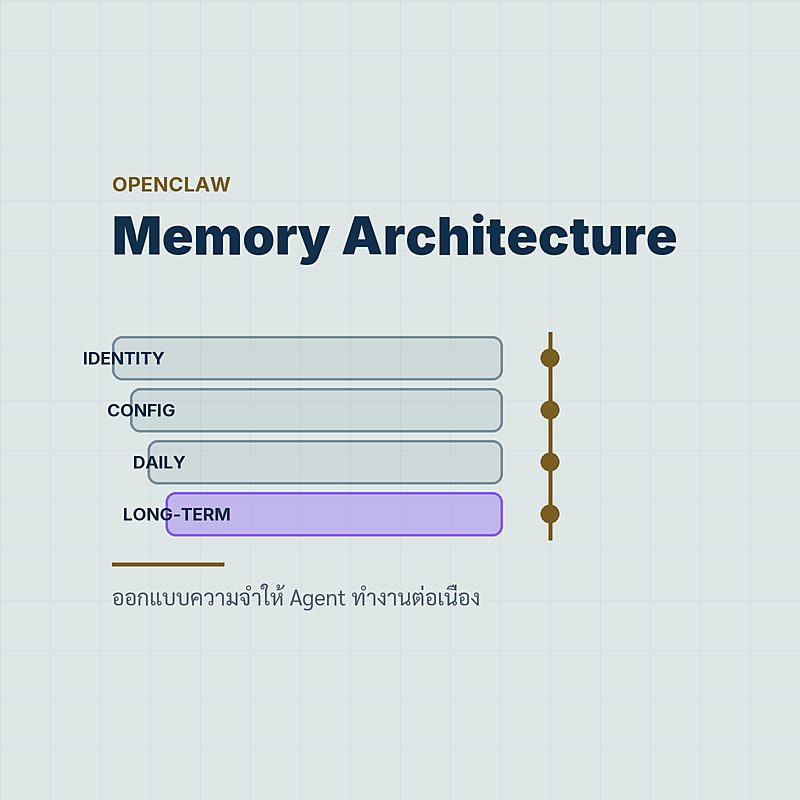
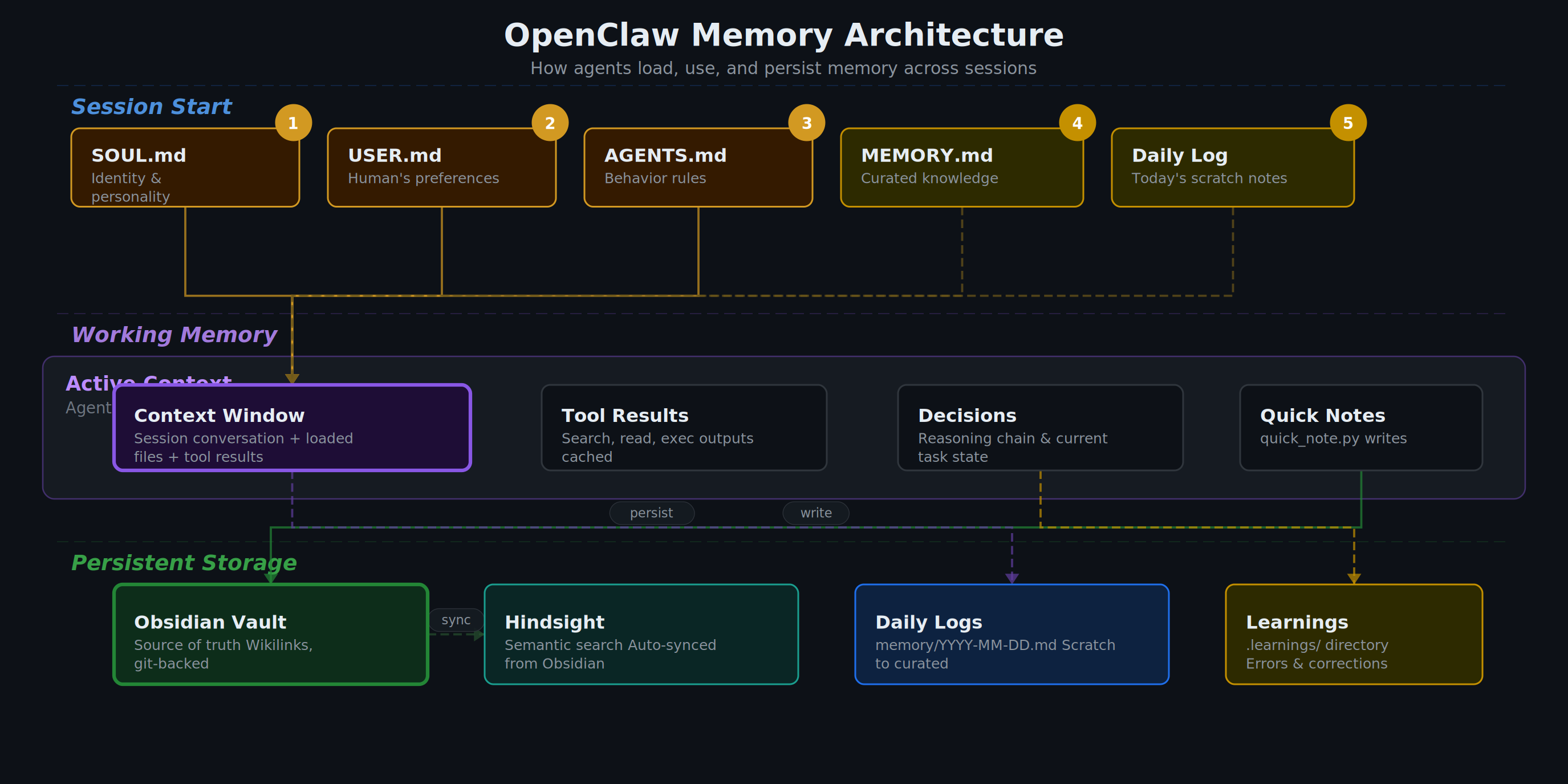
ภาพรวมโครงสร้าง Memory Architecture
โครงนี้ทำงานดีเพราะเริ่มจาก identity ก่อนเสมอ แล้วค่อยไป config และ memory ทำให้ agent รักษาบุคลิก กติกา และบริบทงานได้พร้อมกัน
SOUL.md → USER.md → memory/today.md (+yesterday) → MEMORY.md (เฉพาะ main session)
Identity Files: กำหนดว่า “ฉันเป็นใคร” และ “กำลังช่วยใคร”
Workspace Config: กติกาการทำงาน ความปลอดภัย และ periodic tasks
Memory System: Daily logs + Curated long-term memory + Topic notes
Layer 1: Identity (Who I am)
Layer นี้ไม่ใช่เรื่องสวยงาม แต่เป็นแกนของ consistency ในการตอบและการตัดสินใจ
SOUL.md— โทนเสียง ขอบเขต บุคลิกUSER.md— ความชอบและรูปแบบการทำงานของเจ้าของIDENTITY.md— ชื่อ/บทบาทของ agent
ข้อดีคือแม้ model เปลี่ยนหรือ session restart วิธีคิดหลักยังคงเดิม เพราะ grounded จากไฟล์ก่อนเริ่มงานทุกครั้ง
Layer 2: Workspace Config (How I operate)
ชั้นนี้คือ operational contract ที่ทำให้ agent ไม่เผลอทำเกินขอบเขต
AGENTS.md— policy การทำงาน privacy firewall กติกา owner-onlyTOOLS.md— รายละเอียด infra/local stack ที่ต้องใช้ซ้ำHEARTBEAT.md— รายการเช็กแบบ periodic (ถ้าไม่มี task ก็ไม่ต้องยิง API)
แยก “policy” ออกจาก “knowledge” ชัด ๆ: policy อยู่ AGENTS.md ส่วนความรู้ operational อยู่ memory files เพื่อให้ update ง่ายและ audit ง่าย
Layer 3: Memory System (What I remember)
3.1 Daily Notes = short-term durable log
ไฟล์รายวันใน memory/YYYY-MM-DD.md เหมาะสำหรับบันทึกเหตุการณ์ดิบ เช่น แก้ bug อะไร ตัดสินใจอะไร ทดลองอะไรแล้วผลเป็นอย่างไร
3.2 MEMORY.md = long-term curated memory
ไฟล์นี้ไม่ควรเป็น dump ทุกอย่าง แต่เป็นสิ่งที่ “ควรอยู่ระยะยาว” เช่น preferences, decisions, lessons learned, recurring pitfalls
3.3 Topic Notes = deep reference
ไฟล์เฉพาะเรื่อง เช่น infra-setup-notes.md, rag-setup-notes.md ช่วยให้ตอบคำถามเทคนิคเร็วขึ้นโดยไม่ต้องค้นทั้งประวัติ
Workflow ที่ควรใช้จริงในทุก session
โฟลว์นี้ทำให้ memory เป็นระบบจริง ไม่ใช่แค่ “หวังว่าจะจำได้”
ตัวอย่างโครงสร้างไฟล์ที่แนะนำ
ด้านล่างคือตัวอย่างที่ใช้งานได้จริงและขยายต่อได้ง่าย
workspace/
├── SOUL.md
├── USER.md
├── IDENTITY.md
├── AGENTS.md
├── TOOLS.md
├── HEARTBEAT.md
├── MEMORY.md
└── memory/
    ├── 2026-03-20.md
    ├── infra-setup-notes.md
    ├── rag-setup-notes.md
    ├── knowledge-graph-setup.md
    └── system-hardening-notes.md
เหตุผลที่โครงนี้ดีคืออ่านง่าย, แยก concern ชัด, และรองรับทั้งงานรายวันกับงานที่ต้อง maintain ระยะยาว
ข้อผิดพลาดที่เจอบ่อย
- เก็บทุกอย่างไว้ในไฟล์เดียว ทำให้ค้นยากและเสี่ยง context noise
- ไม่ทบทวน daily notes เป็นระยะ ทำให้ MEMORY.md ไม่เคย evolve
- คิดว่า “จำไว้ในหัวก็พอ” ซึ่งพังแน่เมื่อ session reset
- ปะปนข้อมูลส่วนตัวจาก main session ไป shared context (ผิดหลัก privacy)
Decision Matrix: อะไรควรเก็บไฟล์ไหน?
จุดตัดสินใจที่สำคัญที่สุดคือ “ข้อมูลนี้มีอายุการใช้งานนานแค่ไหน” และ “ต้องใช้ข้าม session หรือไม่” ถ้าตอบไม่ได้ชัด ให้เริ่มจาก daily note แล้วค่อย promote ขึ้น MEMORY.md ภายหลัง
- Identity/voice boundary →
SOUL.md - User preference ที่คงที่ →
USER.md - กติกาการปฏิบัติ/ความปลอดภัย →
AGENTS.md - เหตุการณ์รายวันแบบดิบ →
memory/YYYY-MM-DD.md - บทเรียน/การตัดสินใจระยะยาว →
MEMORY.md - ความรู้ลึกเฉพาะโดเมน →
memory/*-notes.md
Governance Boundary: Main Session vs Shared Context
ในงานจริง เรื่องนี้สำคัญกว่าความฉลาดของโมเดล เพราะถ้า boundary ไม่ชัด มีโอกาสเกิด data leakage ทันที
อ่าน MEMORY.md ได้เต็มรูปแบบ และใช้เพื่อ personalization ในการทำงานกับเจ้าของระบบ
ห้ามดึง personal long-term memory มาใช้โดยไม่จำเป็น เน้นตอบตาม context ปัจจุบันเท่านั้น
เมื่อไม่มั่นใจว่าข้อมูลควรถูกเปิดเผยหรือไม่ ให้ default เป็น ไม่เปิดเผย และถามเพื่อยืนยันก่อนเสมอ
Anti-Patterns และวิธีแก้
1) ใช้ MEMORY.md เป็น log รายวัน
ปัญหา: ไฟล์บวมเร็ว ค้นยาก สัญญาณสำคัญจมหาย
แก้: บันทึกดิบไว้ daily files แล้วทำ weekly curation
2) เก็บ policy ปะปนกับ operational notes
ปัญหา: ตอนแก้ config จะเผลอทำลายกฎความปลอดภัย
แก้: policy อยู่ AGENTS.md อย่างเดียว ส่วนเทคนิคปฏิบัติไป TOOLS.md/memory/*-notes.md
3) ไม่ทำ promotion cycle
ปัญหา: มีแต่ daily log แต่ไม่เกิด long-term intelligence
แก้: ตั้งรอบ review ทุก 2-3 วัน และ promote เฉพาะสิ่งที่มีผลต่อการตัดสินใจอนาคต
4) ลืม privacy context boundary
ปัญหา: ข้อมูล private จาก main session หลุดไปในกลุ่ม
แก้: บังคับ contextual gate ก่อนตอบทุกครั้งว่าเป็น DM หรือ shared channel
สรุป: ความเก่งของ Agent = ความต่อเนื่อง + governance ของระบบความจำ
ถ้าจะทำให้ AI assistant ใช้งานในระดับ production โดยเฉพาะงานวิจัย งานเอกสาร หรือ infra automation ให้คิดแบบ system design ตั้งแต่แรก: แยกชั้นความจำ, กำหนด lifecycle, บังคับ memory promotion, และวาง governance boundary ให้ชัด
เมื่อทำครบ Agent จะไม่ใช่แค่ “ตอบเก่ง” แต่จะ “ทำงานต่อเนื่องได้จริง ปลอดภัย และ audit ได้” เหมือนทีมงานมืออาชีพที่มีทั้งสมุดบันทึกและระเบียบการทำงานชัดเจน
Why Does an Agent Need a "Memory Architecture"?
The classic problem with an AI assistant is that it is brilliant inside one session, and then the context resets and it starts from zero. The result is repeated work, decisions that do not build on one another, and time lost recapping everything all over again.
The approach that actually works is to separate memory into layers, each with a clear job: which file is for what, and when it should be updated.
If something matters and has to survive across sessions, write it to a file — always. Text > Brain
The Memory Architecture at a Glance
This structure works because it always starts from identity, then moves on to config and memory. That order lets the agent hold on to its personality, its rules, and the context of the work all at the same time.
SOUL.md → USER.md → memory/today.md (+yesterday) → MEMORY.md (main session only)
Identity Files: define "who I am" and "who I am helping"
Workspace Config: operating rules, safety, and periodic tasks
Memory System: Daily logs + Curated long-term memory + Topic notes
Layer 1: Identity (Who I am)
This layer is not decoration. It is the backbone of consistency in how the agent answers and how it decides.
SOUL.md— tone of voice, boundaries, personalityUSER.md— the owner's preferences and working styleIDENTITY.md— the agent's name and role
The benefit is that even when the model changes or the session restarts, the core way of thinking stays the same, because it is grounded in files before any work begins.
Layer 2: Workspace Config (How I operate)
This layer is the operational contract that keeps the agent from wandering past its boundaries.
AGENTS.md— working policy, privacy firewall, owner-only rulesTOOLS.md— details of the infra/local stack that get reused constantlyHEARTBEAT.md— the periodic checklist (no task means no API call)
Keep "policy" cleanly separated from "knowledge": policy lives in AGENTS.md, operational knowledge lives in the memory files. That makes both easy to update and easy to audit.
Layer 3: Memory System (What I remember)
3.1 Daily Notes = short-term durable log
The daily files in memory/YYYY-MM-DD.md are the right place for raw events: which bug was fixed, which decision was made, what was tried and what came of it.
3.2 MEMORY.md = long-term curated memory
This file should not be a dump of everything. It holds what "deserves to last" — preferences, decisions, lessons learned, recurring pitfalls.
3.3 Topic Notes = deep reference
Subject-specific files such as infra-setup-notes.md and rag-setup-notes.md make technical questions faster to answer without digging through the whole history.
The Workflow to Use in Every Session
This flow is what turns memory into a real system instead of just "hoping it remembers".
A Recommended File Structure
Below is a layout that works in practice and is easy to extend.
workspace/
├── SOUL.md
├── USER.md
├── IDENTITY.md
├── AGENTS.md
├── TOOLS.md
├── HEARTBEAT.md
├── MEMORY.md
└── memory/
    ├── 2026-03-20.md
    ├── infra-setup-notes.md
    ├── rag-setup-notes.md
    ├── knowledge-graph-setup.md
    └── system-hardening-notes.md
This structure is good because it is easy to read, it separates concerns cleanly, and it serves both the day-to-day work and the things that have to be maintained for the long haul.
Common Mistakes
- Keeping everything in a single file, which makes searching hard and invites context noise
- Never revisiting the daily notes, so MEMORY.md never evolves
- Assuming "keeping it in my head is enough", which breaks the moment the session resets
- Letting personal data from the main session bleed into shared context (a privacy violation)
Decision Matrix: What Belongs in Which File?
The most important decision points are "how long does this information stay useful?" and "does it need to cross sessions?" If the answer is not clear, start with a daily note and promote it to MEMORY.md later.
- Identity/voice boundary →
SOUL.md - Stable user preferences →
USER.md - Operating and safety rules →
AGENTS.md - Raw day-to-day events →
memory/YYYY-MM-DD.md - Long-term lessons and decisions →
MEMORY.md - Deep domain-specific knowledge →
memory/*-notes.md
Governance Boundary: Main Session vs Shared Context
In real work this matters more than how clever the model is, because an unclear boundary means data leakage is one answer away.
Full read access to MEMORY.md, used for personalization while working with the system's owner.
Never pull in personal long-term memory unless it is genuinely needed. Answer from the current context only.
When it is not clear whether something should be disclosed, default to not disclosing it and ask for confirmation first, every time.
Anti-Patterns and How to Fix Them
1) Using MEMORY.md as a daily log
Problem: the file bloats fast, searching becomes hard, and the important signals sink out of sight
Fix: keep the raw record in the daily files and curate weekly
2) Mixing policy in with operational notes
Problem: a config edit inadvertently destroys a safety rule
Fix: policy lives in AGENTS.md and nowhere else; operational technique goes into TOOLS.md/memory/*-notes.md
3) Having no promotion cycle
Problem: plenty of daily logs, but no long-term intelligence ever forms
Fix: set a review cycle every 2-3 days and promote only what will affect future decisions
4) Forgetting the privacy context boundary
Problem: private information from the main session leaks into a group
Fix: enforce a contextual gate before every answer — is this a DM or a shared channel?
Conclusion: A Capable Agent = Continuity + Governance of Its Memory System
If you want an AI assistant that holds up in production — especially for research, document work, or infra automation — think like a system designer from the start: separate the memory layers, define the lifecycle, enforce memory promotion, and draw the governance boundary clearly.
Do all of that and the agent stops being merely "good at answering" and becomes something that "genuinely works continuously, safely, and auditably" — like a professional colleague who keeps both a notebook and a clear set of working procedures.