
ในบทความนี้
In this post
ปัญหาที่เรามักมองข้าม
AI Agent ส่วนใหญ่ทำงานแบบ "ถาม-ตอบ" — ถ้าคุณไม่ส่งข้อความ มันก็นั่งเฉยๆ ไม่ทำอะไรเลย เหมือนพนักงานที่รอคำสั่งอย่างเดียว ไม่เคยหันไปจัดโต๊ะหรือเช็คงานค้างเอง
แต่ถ้าเราบอก Agent ได้ว่า "เมื่อไม่มีใครคุยด้วย ให้ตรวจสอบระบบแทน" — เวลาว่างที่เคยสูญเปล่าก็กลายเป็นงานจริงที่ช่วยเราได้
🏠 เปรียบเทียบง่ายๆ
ลองนึกถึงผู้ช่วยที่ดี — เมื่อเจ้านายไปประชุม แทนที่จะนั่งเล่นโทรศัพท์ ผู้ช่วยคนนี้จะ: จัดเอกสาร, เช็คอีเมล, ดูว่าของในออฟฟิศขาดอะไรไหม นั่นคือสิ่งที่ Idle Self-Improvement ทำให้ AI Agent ของคุณ
Idle Improver คืออะไร?
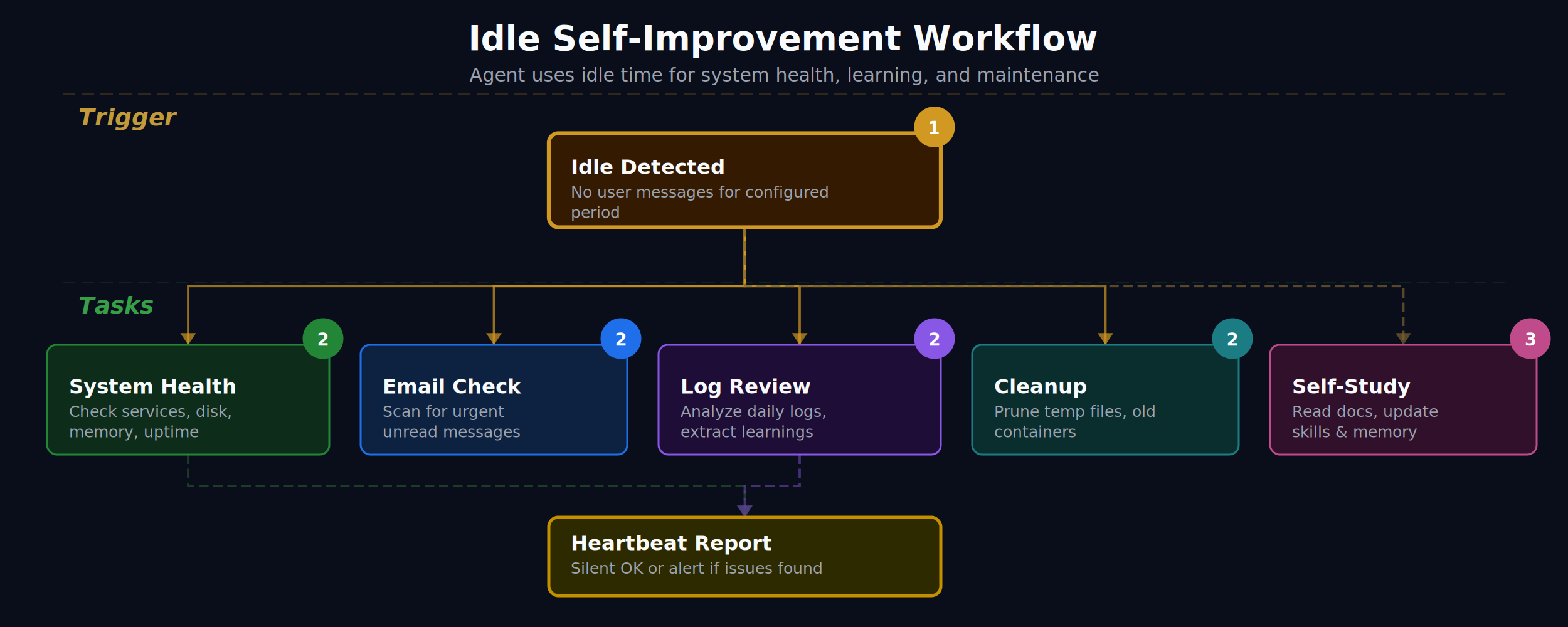
Idle Improver เป็น Python script ที่ทำงานทุก 30 นาที ผ่าน cron job โดยมันจะ:
- เช็คก่อนว่าระบบว่างจริงไหม — ถ้ามีคนกำลังคุยกับ Agent อยู่ มันจะข้ามไปเลย ไม่รบกวน
- สแกนปัญหาหลายด้าน — disk เต็มไหม? memory สูงไปไหม? Docker container มีตัวไหนพังไหม?
- บันทึกผลลงไฟล์ — เก็บรายงานเป็น markdown ให้ Agent อ่านทีหลังได้
มันตรวจอะไรบ้าง?
Idle Improver ตรวจ 7 ด้านที่สำคัญที่สุดสำหรับเซิร์ฟเวอร์:
Docker Containers
ตรวจว่ามี container ที่ restarting วนลูป หรือ exit แบบผิดปกติไหม — ปัญหาที่มักเงียบจนกว่าลูกค้าจะบ่น
Disk Usage
แจ้งเตือนเมื่อ partition ใช้เกิน 85% — ก่อนที่ระบบจะเต็มจนหยุดทำงาน
Memory Usage
ตรวจ RAM ว่าใช้เกิน 80% ไหม — จับ memory leak ก่อนที่จะ crash
Stale Temp Files
หาไฟล์ใน tmp/ ที่เก่ากว่า 7 วัน — ทำความสะอาดขยะที่สะสม
Git Status
เช็ค uncommitted changes — ไม่ให้งานหายเพราะลืม commit
Python Syntax
ตรวจ syntax error ในสคริปต์ทั้งหมด — จับบั๊กก่อนที่จะรัน
Broken Symlinks
หา symbolic link ที่เสีย — ลดปัญหา "file not found" ลึกลับ
Vault Intelligence — ให้ Agent เข้าใจ Knowledge Base ของคุณ
นอกจาก Idle Improver แล้ว ยังมีเครื่องมืออีก 3 ตัวที่ช่วยให้ Agent ทำงานกับ Obsidian vault ของคุณได้อย่างชาญฉลาด:
Vault Stats — แดชบอร์ดสุขภาพ vault
เหมือนหน้า dashboard ของ vault คุณ — จำนวนไฟล์, คำ, ลิงก์, แท็ก, โน้ตที่ถูกทิ้ง, โน้ตกำพร้า ดูภาพรวมได้ในคำสั่งเดียว
python3 tools/vault_stats.pyAsk Vault — ค้นหาด้วยภาษาธรรมชาติ
ถาม vault เหมือนถามคน — "หาโน้ตเกี่ยวกับ machine learning" แทนที่จะจำชื่อไฟล์
python3 tools/ask_vault.py "machine learning"
python3 tools/ask_vault.py "RAG" --limit 5
python3 tools/ask_vault.py "note.md" --relatedVault Insight — วิเคราะห์ theme, gap, connection
วิเคราะห์ vault ในเชิงลึก — หาธีมที่ซ้ำ, โน้ตที่อ้างถึงแต่ไม่เคยสร้าง, โน้ตที่ควรเชื่อมกันแต่ยังไม่ได้ลิงก์ รันอัตโนมัติทุกสัปดาห์
python3 tools/vault_insight.py full --saveตั้งค่าใน 5 ขั้นตอน
การติดตั้งไม่ยากอย่างที่คิด — ใช้เวลาประมาณ 10-15 นาที:
ขั้นที่ 1: สร้างโฟลเดอร์
mkdir -p ~/.openclaw/workspace/tools
mkdir -p ~/.openclaw/workspace/memory
mkdir -p ~/.openclaw/workspace/logs
mkdir -p ~/.openclaw/workspace/tmp
ขั้นที่ 2: วางสคริปต์
ดาวน์โหลดหรือสร้างไฟล์ 4 ตัวใน tools/:
workspace/tools/
├── idle_improver.py    # สแกนสุขภาพระบบ
├── vault_insight.py    # วิเคราะห์ vault
├── vault_stats.py      # แดชบอร์ด vault
└── ask_vault.py        # ค้นหาใน vault
ขั้นที่ 3: แก้ path ให้ตรง
ในแต่ละสคริปต์ แก้ 2 บรรทัดนี้ให้ตรงกับเครื่องคุณ:
WORKSPACE = Path("~/.openclaw/workspace").expanduser()
VAULT = Path("~/obsidian-vault").expanduser()  # ← path ของ vault คุณ
ขั้นที่ 4: ตั้ง cron job
# เปิด crontab
crontab -e

# เพิ่ม 2 บรรทัดนี้:
*/30 * * * * /usr/bin/python3 ~/.openclaw/workspace/tools/idle_improver.py
0 3 * * 1 /usr/bin/python3 ~/.openclaw/workspace/tools/vault_insight.py full --save
บรรทัดแรก = สแกนทุก 30 นาที, บรรทัดที่สอง = วิเคราะห์ vault ทุกวันจันทร์ตี 3
ขั้นที่ 5: ทดสอบ
# ทดสอบ idle improver (บังคับรัน)
python3 tools/idle_improver.py --force

# ทดสอบ vault stats
python3 tools/vault_stats.py

# ทดสอบค้นหา
python3 tools/ask_vault.py "test query"
ขั้นสุดท้าย: บอก Agent ให้รู้จักเครื่องมือ
เพิ่มใน AGENTS.md ของ workspace:
## Vault Intelligence Tools
- `python3 tools/vault_stats.py` — vault dashboard
- `python3 tools/ask_vault.py "query"` — search vault
- `python3 tools/vault_insight.py full` — theme/gap analysis
- `python3 tools/idle_improver.py --force` — system health scan
ทำไมต้องตั้งค่าเรื่องนี้?
🎯 ประโยชน์ที่ได้จริง
- ป้องกันปัญหาแทนที่จะแก้ปัญหา — รู้ว่า disk เต็มก่อนที่ระบบจะล่ม ดีกว่าตื่นมาเจอเซิร์ฟเวอร์ลง
- ประหยัดเวลา — แทนที่จะ SSH เข้าไปเช็คเซิร์ฟเวอร์เอง Agent ทำให้ทุก 30 นาที
- Knowledge base ไม่เน่า — Vault Insight หาโน้ตที่ถูกทิ้ง ลิงก์ที่เสีย gap ที่ขาด ให้อัตโนมัติ
- ค้นหาเร็วขึ้น — ถาม vault ด้วยภาษาธรรมชาติแทนที่จะจำชื่อไฟล์
- Zero cost เมื่อระบบดี — ถ้าไม่มีปัญหา สคริปต์ exit เงียบ ไม่ใช้ token ไม่รบกวน
💡 กรณีตัวอย่างจริง
เช้าวันจันทร์ คุณเปิดแชทกับ Agent แล้วเห็นรายงาน:
🔴 Disk /var at 92%
🟡 Memory at 83% (1660M/2000M)
🔵 workspace: 5 uncommitted changes
คุณรู้ทันทีว่าต้องจัดการอะไร — โดยไม่ต้อง SSH เข้าเซิร์ฟเวอร์ ไม่ต้องจำว่าจะเช็คอะไร Agent ทำให้ตอนตี 3 แล้ว
เหมาะกับใคร?
- Solo developer ที่รันเซิร์ฟเวอร์เอง — ไม่มี ops team คอยดูให้
- คนใช้ Obsidian ที่มีโน้ตเยอะ — vault ใหญ่จะหาอะไรยากขึ้นเรื่อยๆ ถ้าไม่มีเครื่องมือช่วย
- ทีมเล็ก ที่อยากได้ monitoring แบบง่ายๆ — ไม่ต้อง setup Prometheus/Grafana เต็มรูปแบบ
- ทุกคนที่ใช้ OpenClaw — เพราะ Agent ของคุณว่างอยู่แล้ว ทำไมไม่ให้มันทำงานที่เป็นประโยชน์?
📌 สรุป
- Idle Improver ทำให้ AI Agent ตรวจสุขภาพระบบอัตโนมัติทุก 30 นาทีเมื่อว่าง
- Vault Intelligence (Stats + Ask + Insight) ให้ Agent เข้าใจและวิเคราะห์ knowledge base ได้
- ตั้งค่าง่าย 5 ขั้นตอน ใช้เวลา 10-15 นาที
- ไม่มี cost เพิ่มเมื่อระบบปกติ — สคริปต์ exit เงียบๆ
- เปลี่ยน Agent จาก "reactive" (รอคำสั่ง) เป็น "proactive" (ดูแลระบบเอง)
"The best monitoring is the kind you don't have to remember to do."
The Problem We Tend to Overlook
Most AI Agents work in a "question-and-answer" mode — if you do not send a message, they simply sit there doing nothing at all. Like an employee who only ever waits for orders, and never turns around to tidy the desk or check what work is still outstanding.
But if we can tell the Agent "when nobody is talking to you, go check the system instead" — then the idle time that used to be wasted becomes real work that helps us.
🏠 A Simple Comparison
Think of a good assistant — when the boss is in a meeting, instead of sitting there scrolling on a phone, this assistant will: file the documents, check the email, see whether the office is running short of anything. That is exactly what Idle Self-Improvement does for your AI Agent.
What Is Idle Improver?
Idle Improver is a Python script that runs every 30 minutes through a cron job. On each run it:
- Checks first whether the system is genuinely idle — if someone is in the middle of a conversation with the Agent, it skips the run entirely and does not interrupt.
- Scans for problems across several fronts — is the disk full? Is memory running high? Is any Docker container broken?
- Writes the results to a file — it keeps the report as markdown so the Agent can read it later.
What Does It Check?
Idle Improver checks the 7 areas that matter most on a server:
Docker Containers
Checks whether any container is stuck in a restart loop or has exited abnormally — the kind of problem that usually stays quiet until a customer complains.
Disk Usage
Warns when a partition goes past 85% — before the system fills up and stops working.
Memory Usage
Checks whether RAM is over 80% — catching a memory leak before it turns into a crash.
Stale Temp Files
Finds files in tmp/ older than 7 days — clearing out the junk that accumulates.
Git Status
Checks for uncommitted changes — so no work is lost to a forgotten commit.
Python Syntax
Checks every script for syntax errors — catching the bug before it runs.
Broken Symlinks
Finds broken symbolic links — fewer mysterious "file not found" problems.
Vault Intelligence — Let the Agent Understand Your Knowledge Base
Beyond Idle Improver, there are three more tools that let the Agent work intelligently with your Obsidian vault:
Vault Stats — a health dashboard for the vault
Like a dashboard page for your vault — number of files, words, links, tags, abandoned notes, orphan notes. The whole overview in a single command.
python3 tools/vault_stats.pyAsk Vault — search in natural language
Ask the vault the way you would ask a person — "find notes about machine learning" instead of having to remember the filename.
python3 tools/ask_vault.py "machine learning"
python3 tools/ask_vault.py "RAG" --limit 5
python3 tools/ask_vault.py "note.md" --relatedVault Insight — analyze themes, gaps, connections
Analyzes the vault in depth — finding repeated themes, notes that are referenced but were never created, notes that ought to be connected but are not linked yet. Runs automatically every week.
python3 tools/vault_insight.py full --saveSet It Up in 5 Steps
Installing it is not as hard as you would think — about 10-15 minutes:
Step 1: Create the folders
mkdir -p ~/.openclaw/workspace/tools
mkdir -p ~/.openclaw/workspace/memory
mkdir -p ~/.openclaw/workspace/logs
mkdir -p ~/.openclaw/workspace/tmp
Step 2: Drop in the scripts
Download or create four files in tools/:
workspace/tools/
├── idle_improver.py    # scans system health
├── vault_insight.py    # analyzes the vault
├── vault_stats.py      # vault dashboard
└── ask_vault.py        # searches the vault
Step 3: Fix the paths
In each script, edit these 2 lines to match your machine:
WORKSPACE = Path("~/.openclaw/workspace").expanduser()
VAULT = Path("~/obsidian-vault").expanduser()  # ← your vault's path
Step 4: Set up the cron job
# open crontab
crontab -e

# add these 2 lines:
*/30 * * * * /usr/bin/python3 ~/.openclaw/workspace/tools/idle_improver.py
0 3 * * 1 /usr/bin/python3 ~/.openclaw/workspace/tools/vault_insight.py full --save
The first line = scan every 30 minutes; the second = analyze the vault every Monday at 3 a.m.
Step 5: Test it
# test idle improver (force a run)
python3 tools/idle_improver.py --force

# test vault stats
python3 tools/vault_stats.py

# test the search
python3 tools/ask_vault.py "test query"
Last step: tell the Agent about the tools
Add this to the workspace's AGENTS.md:
## Vault Intelligence Tools
- `python3 tools/vault_stats.py` — vault dashboard
- `python3 tools/ask_vault.py "query"` — search vault
- `python3 tools/vault_insight.py full` — theme/gap analysis
- `python3 tools/idle_improver.py --force` — system health scan
Why Bother Setting This Up?
🎯 The Benefits You Actually Get
- Prevent problems instead of fixing them — knowing the disk is filling up before the system goes down beats waking up to a dead server.
- Save time — instead of SSH-ing in to check the server yourself, the Agent does it every 30 minutes.
- The knowledge base does not rot — Vault Insight finds the abandoned notes, the broken links and the gaps in your coverage for you, automatically.
- Faster searching — ask the vault in natural language instead of remembering filenames.
- Zero cost when the system is fine — if there is no problem, the script exits quietly. No tokens spent, nobody disturbed.
💡 A Real Example
Monday morning, you open the chat with the Agent and see the report:
🔴 Disk /var at 92%
🟡 Memory at 83% (1660M/2000M)
🔵 workspace: 5 uncommitted changes
You know immediately what needs handling — without SSH-ing into the server, without having to remember what to check. The Agent did it at 3 in the morning.
Who Is This For?
- Solo developers running their own server — with no ops team watching it for them.
- Obsidian users with a lot of notes — a big vault only gets harder to search without tools to help.
- Small teams who want simple monitoring — without setting up a full Prometheus/Grafana stack.
- Everyone using OpenClaw — your Agent is idle anyway, so why not have it do something useful?
📌 Summary
- Idle Improver has the AI Agent health-check the system automatically every 30 minutes whenever it is idle.
- Vault Intelligence (Stats + Ask + Insight) lets the Agent understand and analyze your knowledge base.
- Easy to set up in 5 steps, 10-15 minutes of work.
- No added cost when the system is normal — the script exits quietly.
- It turns the Agent from "reactive" (waiting for orders) into "proactive" (looking after the system itself).
"The best monitoring is the kind you don't have to remember to do."